spacestr

đź”” This profile hasn't been claimed yet. If this is your Nostr profile, you can claim it.

Edit
Dan Langille (Unofficial)
Member since: 2026-10-16
Dan Langille (Unofficial)
Dan Langille (Unofficial) 7h

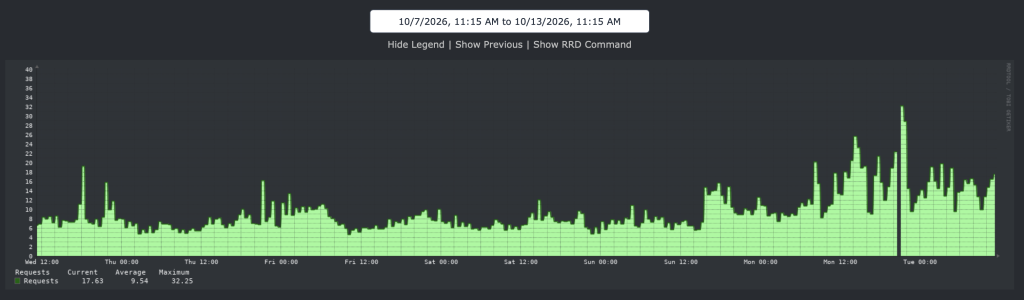
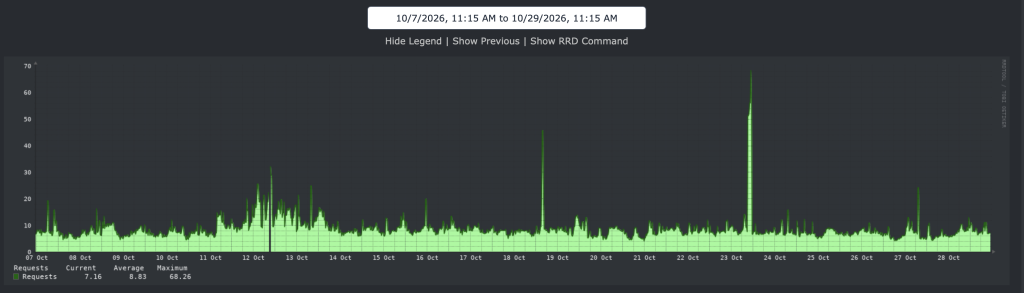
Search gate traffic – how a cookie helped performance On 17 October, at 10:17 UTC, the search gate went live on www.freshports.org. A search from a visitor without a login or a search_ok cookie now gets a small challenge page instead of a search. I wrote about the first day in the FreshPorts October speed-up post. This post looks at the twelve days since. I expected the traffic to drop once the bots got nothing for their trouble. It didn’t. What dropped was the cost of that traffic. What the search gate is The gate is described in detail in Deterring bots, but letting people in. In short: A search runs only if you are logged in or have a search_ok cookie. Without either, you get a page with one button. Press it, and you get the cookie and go back to your search. The cookie lasts a day. Logged-in users never see the page. The cookie, and the token behind the button, are signed with a secret only the server knows. The button stops working after an hour. The Referer header no longer counts. The botnet faked it, which is how it got past the first version of the gate. Most of the work happens in nginx, before the database is involved: A search with a query, but without a login cookie or a search_ok cookie, is sent to search-gate.php instead of search.php. That page shows the button, with a 403, and never connects to the database. Requests for commit.php and vuxml.php without a login cookie get a 401 straight from nginx. PHP never runs. nginx only checks that a cookie is there. PHP checks the signature, so a bot with a made-up cookie still gets the button, but only after search.php has opened a database connection. The empty search form is still open to everyone. Requests per day These numbers come from the nginx access log on aws-1-nginx01, which sits in front of the production database. The log, with its rotated copies, goes back to 15 October. That was already the worst day of the botnet, so I have no quiet week to compare against. Refused means nginx answered with a 401, 403, or 444. None of them reach the database. The 401 and 444 responses come straight from nginx; the 403 is the button page from search-gate.php. Search hits are requests for /search.php or /search-gate.php, whatever the answer. This is the command, run on aws-1-nginx01: sudo sh -c 'for f in /var/log/nginx/freshports.org-access.log*; do case $f in *.bz2) bzcat "$f";; *.gz) zcat "$f";; *.xz) xzcat "$f";; *) cat "$f";; esac; done' | awk '{d=substr($4,2,11); t[d]++; b[d]+=$10; if ($9=="401"||$9=="403"||$9=="444") r[d]++; if ($7 ~ /^\/search(-gate)?\.php/) q[d]++} END {for (d in t) printf "%s %d %d %d %.0f\n", d, t[d], r[d], q[d], b[d]/1048576}' | sort -t/ -k3,3n -k2,2M -k1,1n It prints the day, total requests, refused requests, search hits, and megabytes sent. 29 October was still in progress, so I left it out. Day Requests Refused Refused share Search hits MB sent 15 Oct 744,322 210,873 28% 41,905 6,977 16 Oct 725,042 295,039 41% 63,521 6,193 17 Oct (gate) 728,369 229,191 31% 49,953 6,452 18 Oct 628,048 177,365 28% 18,612 5,798 19 Oct 846,745 340,042 40% 47,689 6,341 20 Oct 658,637 163,243 25% 19,586 6,703 21 Oct 562,659 124,986 22% 23,677 6,929 22 Oct 695,358 166,851 24% 30,418 7,848 23 Oct 1,125,831 667,606 59% 98,901 7,610 24 Oct 631,841 211,097 33% 25,163 7,050 25 Oct 624,703 227,196 36% 21,801 6,577 26 Oct 607,659 152,918 25% 25,920 6,547 27 Oct 578,212 223,205 39% 63,752 6,434 28 Oct 577,425 205,363 36% 34,752 6,253 Total requests stayed between 560,000 and 850,000 a day. The busiest day in the log, 23 October, came six days after the gate: 1.1 million requests, 59% of them refused. The bots did not give up. Requests that got past the refusals fell more slowly, from 450,000–530,000 a day in the first week to about 360,000 on 27 and 28 October. Averaged, the days before and after the gate look like this. These are simple means of the daily totals in the table above. Days Requests a day Change 15–16 Oct, before the gate 734,700 18–28 Oct 685,200 -7% 18–28 Oct, without 23 Oct 641,100 -13% 24–28 Oct 604,000 -18% So daily requests drifted down by 10–18% over the following ten days. That is a slow slide, not a step: 19 October was busier than either day before the gate. The two days before are also both from the middle of the botnet, because that is as far back as the log goes. The gate's real effect is not in the number of requests. It is in what those requests cost the database. Search is where the gate shows. Between 19,000 and 99,000 requests a day still ask for a search. In the first 28 hours after the release, only 504 searches actually ran. That count comes from pg_stat_statements, by counting calls of the query that counts search results. It ran once per search: SELECT sum(calls) FROM pg_stat_statements WHERE regexp_replace(query, '\s+', ' ', 'g') ILIKE '%SELECT count(*) FROM ports P , categories C, element E%'; Nearly every one of those search requests got a refusal or the challenge page. Before the bots The access log can't tell me what a normal week looked like, but LibreNMS can. It graphs requests per second on aws-1-nginx01. This is 7 October to 13 October: From Wednesday to Sunday, traffic sat at 5–10 requests a second, with the odd spike to 16–19. On Sunday afternoon it stepped up to about 14, and on Monday it climbed to 20–25, peaking at 32 late that night. On Tuesday morning it was still 10–18. The average for the week was 9.54 requests a second, the maximum 32.25. The bots were already arriving a few days before search got slow on 14 October. The graph is LibreNMS's nginx requests graph for that host. The average and maximum are from the graph's legend. Before and after Here is the same graph from 7 October to 29 October: The busy stretch from 11 October to 13 October is the bump in the middle. By 14 October traffic was back to 6–10 requests a second, and that is where it has stayed. The gate went in at 10:17 on 17 October, and there is no step down there at all. The spikes since then are bursts the gate refused: 46 requests a second on 18 October, 68 on 23 October, and 24 on 27 October. The log and the graph agree. On 27 and 28 October the log shows about 578,000 requests a day, which is 6.7 a second (578,000 divided by 86,400 seconds). That is about what the graph shows for those days, and about what it showed for 7 to 10 October, before the bots. New users Search has needed a login for a long time. On 22 April I added LOGIN_TO_SEARCH, LOGIN_TO_VIEW_COMMIT, and LOGIN_TO_VIEW_VUXML, because a bot was working through those pages. From then on, the only way to search FreshPorts was to have an account. The first search gate, on 9 October, let people search without one again. The users table records when each account was created, in firstlogin. Its default is the time the row was inserted. I counted new accounts per day, and per month for the past year: SELECT (firstlogin AT TIME ZONE 'UTC')::date AS day, count(*) AS new_users, count(*) FILTER (WHERE status = 'A') AS activated FROM users WHERE firstlogin >= '2026-09-01' GROUP BY 1 ORDER BY 1; SELECT date_trunc('month', firstlogin AT TIME ZONE 'UTC')::date AS month, count(*) AS new_users FROM users WHERE firstlogin >= '2025-10-01' GROUP BY 1 ORDER BY 1; The periods below add up those daily and monthly counts. Here are the new accounts: Period New accounts Per day October 2025 to March 2026 33–72 a month 1–2 May to September 2026, login needed to search 120–275 a month 4–9 1–8 October, login needed to search 24 3 9–14 October, first gate 24 4 15–17 October, login needed to search 6 2 18–28 October, after the gate 8 0.7 April had 135 new accounts, about twice the usual, and the login requirement only started on the 22nd. May had 275. Sign-ups then tailed off over the summer, but stayed well above the months before April. Since the gate went in, they have nearly stopped: eight in eleven days, with none at all from 18 to 21 October. That is below even the quiet months of late 2025. Were the extra accounts people, or bots signing up to get past the login? I looked at two things for each account: whether it was seen again more than a day after it was created, and whether it watches any ports. SELECT date_trunc('month', U.firstlogin AT TIME ZONE 'UTC')::date AS month, count(*) AS new_users, count(*) FILTER (WHERE U.lastlogin > U.firstlogin + interval '1 day') AS came_back, count(*) FILTER (WHERE EXISTS (SELECT 1 FROM watch_list WL JOIN watch_list_element WLE ON WLE.watch_list_id = WL.id WHERE WL.user_id = U.id)) AS watches_ports FROM users U WHERE U.firstlogin >= '2025-10-01' GROUP BY 1 ORDER BY 1; Added up by period: Accounts created New accounts Seen again Watch ports October 2025 to March 2026 344 215 (62%) 37 (11%) April to September 2026 1,027 657 (64%) 47 (5%) The newer accounts came back just as often, but were less than half as likely to watch a port. That is what you would expect from people who signed up to search, not to keep track of ports. A logged-in bot would also come back and never watch anything, so this doesn't rule bots out. But the simplest reading is that the login requirement made people create accounts, and the gate means they no longer have to. The lastlogin column doesn't help here. It is updated on every page a logged-in user views, so it records when each user was last seen. Each user only shows up on their most recent day, and any count by day rises toward today. What it costs the database The number I care about is database time, which I give in seconds per hour (s/hour). Here is how it is measured. Production runs the pg_stat_statements extension. For each distinct query, it keeps a running total of the time spent executing it, in total_exec_time. I reset the statistics with pg_stat_statements_reset(), wait, then add up total_exec_time across every query and divide by the hours since the reset: SELECT sum(total_exec_time) / 1000 / (extract(epoch FROM now() - stats_reset) / 3600) AS seconds_per_hour FROM pg_stat_statements, pg_stat_statements_info; Some things to know about that number: It is query execution time only. Planning time is not counted, because pg_stat_statements.track_planning is off by default. Neither is time spent in PHP, nginx, or on the network. It is summed across all connections. Ten queries running for one second at the same time count as ten seconds. 188 s/hour means the database spent about 5% of one CPU's hour running queries, on average. It counts every query, not just searches. That includes the nightly pg_dump, which took about 53 s/hour of the 188. To compare like with like, each window covers the same hours of the day, so both include the nightly dump. pg_stat_statements only keeps so many distinct queries. When it fills up, it evicts the least-used, and their time goes with them. So a window much longer than a day undercounts. I check pg_stat_statements_info.dealloc to see whether that has happened. Each figure below comes from that query, run at the end of the window, after a reset at its start: Window Database time Before the October release 471 s/hour First 28 hours with the gate 401 s/hour 20–21 October, with the gate and the query fixes 188 s/hour (about 134 without the dump) Not all of that drop is the gate. The same release made searches and list pages much faster. The count query behind search went from 1,676 ms to 20 ms. Those are mean_exec_time values from pg_stat_statements, from the October speed-up post. The gate's part is that the refused requests never reach the database at all. Before the gate, each refusal still started PHP and opened a database connection. Now nginx either refuses them itself or hands them to a small page that never touches the database. Search is faster too FreshPorts records how long each page took to render in page_load_detail. Only searches that actually run are recorded. Refusals and the button page are not, so the bots don't skew these numbers. Detail rows are kept for about eight days, so the before numbers come from the October speed-up post, which used the same table at the time. The after numbers come from this query: SELECT date_trunc('week', date)::date AS week, user_id IS NOT NULL AS logged_in, count(*) AS searches, round(avg(extract(epoch FROM rendering_time))::numeric, 3) AS avg_s, round(percentile_cont(0.5) WITHIN GROUP (ORDER BY extract(epoch FROM rendering_time))::numeric, 3) AS p50_s, round(percentile_cont(0.95) WITHIN GROUP (ORDER BY extract(epoch FROM rendering_time))::numeric, 3) AS p95_s, round(max(extract(epoch FROM rendering_time))::numeric, 3) AS max_s FROM page_load_detail WHERE page_name = '/search.php' AND full_url ~ '[?&]query=[^&]' AND date >= '2026-09-01' GROUP BY 1, 2 ORDER BY 1, 2; It splits logged-in and anonymous searches. The table rounds the two together. Searches Median 95th percentile Week before 15 October, logged-in name searches 1.4 s 2.7 s 15 October, logged-in name searches 2.3 s 8.4 s 19–25 October, all searches 0.09 s 0.23 s 26–29 October, all searches 0.08 s 0.18–0.26 s A typical search now takes under a tenth of a second, where it used to take well over one. Almost all of that is the faster queries in the release, not the gate. What the gate does is keep it that way: with the bots refused before they reach the database, the slowest search in the last ten days took 4.1 seconds. The worst hour on 15 October averaged 21 seconds. More searches are running, too. From 19 to 25 October, 4,379 searches ran, about 625 a day. Before the bots arrived it was 200–330 a day. About 60% of them come from visitors who are not logged in and pressed the button. I don't yet know how many of those are people. Pressing a button is not hard for a bot that cares to try. Are the anonymous searches people? To find out, I compared the anonymous searches with the logged-in ones, on the assumption that logged-in users are people. This covers 21 to 29 October, which is what page_load_detail still held: CREATE TEMP VIEW s AS SELECT user_id IS NOT NULL AS logged_in, ip_address, network(set_masklen(ip_address, CASE family(ip_address) WHEN 4 THEN 24 ELSE 48 END)) AS net, coalesce(nullif(substring(full_url FROM '[?&]stype=([^&#]*)'), ''), 'name') AS stype, lower(substring(full_url FROM '[?&]query=([^&#]*)')) AS q, date + time AS ts FROM page_load_detail WHERE page_name = '/search.php' AND full_url ~ '[?&]query=[^&]'; -- overall: how spread out, how varied SELECT logged_in, count(*) AS searches, count(DISTINCT ip_address) AS ips, count(DISTINCT net) AS nets, round(count(*)::numeric / count(DISTINCT ip_address), 1) AS per_ip, count(DISTINCT q) AS distinct_queries, round(100.0 * count(*) FILTER (WHERE stype = 'depends_all') / count(*), 1) AS pct_depends_all, round(100.0 * count(*) FILTER (WHERE stype = 'maintainer') / count(*), 1) AS pct_maintainer, min(ts), max(ts) FROM s GROUP BY 1; -- hour of day (UTC) SELECT extract(hour FROM ts) AS hour, count(*) FILTER (WHERE NOT logged_in) AS anon, count(*) FILTER (WHERE logged_in) AS logged_in FROM s GROUP BY 1 ORDER BY 1; Anonymous Logged in Searches 3,640 2,539 Addresses 1,319 681 Searches per address 2.8 3.7 Different queries, as a share of searches 37% 39% "Depends on this port (all)" searches 0.3% 0.2% Maintainer searches 0.7% 0.7% The two groups look alike. During the botnet, "depends on this port (all)" and maintainer searches made up most of the anonymous traffic. Now they are under 1% for both groups, and 97% of searches are plain name searches. Both groups follow the clock: the quietest hours are around midnight UTC, and the busiest are 14:00 to 19:00, when Europe and the Americas are both awake. A botnet doesn't sleep. The busiest anonymous addresses look like people too. The top one ran 59 searches in two and a half hours, 56 of them different. Most of the others did 15 to 40 searches in an hour or two, then stopped. Then I looked at the browsers behind the button presses, which are a POST to /search-gate.php answered with a 303: sudo sh -c 'for f in /var/log/nginx/freshports.org-access.log*; do case $f in *.bz2) bzcat "$f";; *.gz) zcat "$f";; *.xz) xzcat "$f";; *) cat "$f";; esac; done' | awk -F'"' '$2 ~ /^POST \/search-gate\.php/ && $3 ~ / 303 / {print $6}' | sort | uniq -c | sort -rn | head -20 From 15 October to midday on 29 October, the button was pressed 2,249 times. These are the twenty most common user agents, which account for 1,506 of those presses: Presses Browser User agent 361 Fire https://dan.langille.org/2026/10/29/search-gate-traffic-how-a-cookie-helped-performance/ #search #cookie #gate #oct #requests #traffic #refused #php #rss #feeds #linksharing #qwibbit
#search #cookie #gate #oct #requests
Dan Langille (Unofficial)
Dan Langille (Unofficial) 2d

Quieting a jail’s mail, and a prompt that wasn’t mine I was looking inside the index jail today and found this: root@index:/ # ls -l /var/mail/ total 25 -rw--w---- 1 root mail 51258 Oct 27 03:27 root That jail doesn’t do much. Nobody reads that mail. I wanted it gone. Along the way, I fixed something else which had been bothering me for a while: a broken prompt whenever I used jexec. What was in the mailbox Before turning anything off, I checked what was being sent: grep '^Subject:' /var/mail/root | sort | uniq -c | sort -rn 24 Subject: index daily security run output 24 Subject: index daily run output 3 Subject: index weekly run output All of it is from periodic(8). Nothing from cron. That makes it simple. Sending periodic output to log files periodic can write its reports to a file instead of mailing them. These settings go in /etc/periodic.conf: sysrc -f /etc/periodic.conf daily_output=/var/log/daily.log \ daily_status_security_output=/var/log/daily.log weekly_output=/var/log/weekly.log \ monthly_output=/var/log/monthly.log FreeBSD’s default /etc/newsyslog.conf already rotates daily.log, weekly.log, and monthly.log, so there is nothing else to configure. The reports are still there if I want them. They just don’t pile up in a mailbox. But… I think a better way is to disable cron and syslogd for that matter. Nothing runs in these jails. # sysrc cron_enable="NO" cron_enable: YES -> NO # sysrc syslogd_enable="NO" syslogd_enable: YES -> NO Tonight’s run will confirm it. After that, I cleared the old mail: : > /var/mail/root If cron jobs had been sending mail too, sysrc cron_flags="-m ''" turns that off for every crontab. I didn’t need it here. I would not do that on a jail which does real work: a failing cron job would then fail silently. The broken prompt While doing this, I kept seeing this as my prompt: [%F{cyan}%B%T%b%f %F{magenta}%m%b%f %F{green}%B%n%b%f %F{magenta}%B%~%b%f] %#%b%f That is my zsh prompt, unexpanded. The shell was /bin/sh, and PS1 was in the environment: % echo $0 /bin/sh % env | grep -E '^(PS1|PROMPT)=' PS1=[%F{cyan}%B%T%b%f %F{magenta}%m%b%f ... Something was exporting PS1. Every child shell inherited it. zsh understands those %F{…} escapes. sh does not, so it printed them as-is. Neither zsh nor bash needs the prompt exported. It should be a plain shell variable. Finding the export The obvious culprit was in ~/.zshrc: export PS1="[$cTIM%T$cSTD $cSRV%m$cSTD $cUSR%n$cSTD $cPWD%~$cSTD] $cPMT%#$cSTD " I removed the export. A fresh login to dvl-ingress01 still had PS1 exported. I checked allexport: not set. I checked whether ssh was sending it from pro05: no, only LANG and LC_*, and sshd on the other end accepts nothing extra. Then I stopped guessing and asked zsh to trace its own startup. The env -u PS1 starts it with a clean slate. The -x trace prefixes each line with the file and line number it came from: ssh -t dvl-ingress01 'env -u PS1 zsh -l -i -x -c exit 2>&1 | grep -nE "PS1|export|typeset"' Most of the output was compinit noise. The useful part was this: +/usr/home/dvl/src/scripts/bash_profile_global:16> export PS1=... ... +/usr/home/dvl/.zshrc:42> PS1='[%F{cyan}%B%T%b%f ...' +/usr/home/dvl/.zshrc:43> export PS2='[%F{cyan}%B%T%b%f %F{green}%B>%b%f] %F{magenta}%B' My .zshrc sources bash_profile_global, a file I share with bash. Line 16 of that file exports a bash-style PS1. When .zshrc later assigns the zsh prompt, the variable is already exported, and it stays that way. Removing the export from .zshrc could never have been enough. The trace also showed PS2 being exported, with the same problem. The fix Three lines, two files, no more export: Index: bash_profile_global =================================================================== -export PS1="[\[$(tput sgr0)\]\[\033[38;5;11m\]\u\[$(tput sgr0)\]@\h:..." +PS1="[\[$(tput sgr0)\]\[\033[38;5;11m\]\u\[$(tput sgr0)\]@\h:..." Index: zshrc =================================================================== -export PS1="[$cTIM%T$cSTD $cSRV%m$cSTD $cUSR%n$cSTD $cPWD%~$cSTD] $cPMT%#$cSTD " -export PS2="[$cTIM%T$cSTD $cUSR>$cSTD] $cPWD" +PS1="[$cTIM%T$cSTD $cSRV%m$cSTD $cUSR%n$cSTD $cPWD%~$cSTD] $cPMT%#$cSTD " +PS2="[$cTIM%T$cSTD $cUSR>$cSTD] $cPWD" Two things caught me out on the way. I edited the files on pro05 and then tested on dvl-ingress01. Each host has its own checkout. sed -i refused to edit ~/.zshrc: "in-place editing only works for regular files". It’s a symlink into ~/src/scripts. Editing the real file, or using "$(realpath ~/.zshrc)", works. Also, an existing shell keeps whatever it already inherited. After the fix, either log in again or clear it by hand: typeset +x PS1 PS2 To confirm the fix, this should print nothing: ssh dvl-ingress01 -t 'zsh -l -i -c "env | grep -E \"^(PS1|PS2)=\""' It did. Now sudo jexec index gives me a plain # prompt, as it should. One side effect: a nested bash started from a bash login shell no longer inherits my custom prompt, because bash_profile_global isn’t read by non-login shells. I can live with that. If not, ~/.bashrc can set it. The lesson When a variable is coming from somewhere you can’t find, zsh -x will tell you. I should have started there. https://dan.langille.org/2026/10/27/quieting-a-jails-mail-and-a-prompt-that-wasnt-mine/ #mail #prompt #subject #cstd #nothing #yes #sending #rss #feeds #linksharing #qwibbit

#mail #prompt #subject #cstd #nothing
Dan Langille (Unofficial)
Dan Langille (Unofficial) 2d

building a patched lang/php81 Recent events made patching many things PHP-related rather urgent. Case in point: I know of a host running php81-8.1.20 on FreeBSD 13.2-RELEASE-p10 – this was from the 2023Q3 ports tree. This host could not be updated, for reasons. Earlier in the day, I had built php83 on both 2025Q2 and 2025Q3 for FreeBSD 14.2 and 14.3 respectively. Again, for hosts which would not be upgraded. That was a simple process: Update PORTVERSION make makesum build PHP 8.1 wasn’t quite so much fun. Building PHP 8.1 – patched The URL at the top of this post contains: “Given the severity of these vulnerabilities, the PHP security team provided minimal source-backports for PHP 7.4, PHP 8.0, and PHP 8.1 to help people building from source or without access to an LTS vendor.” It has a link to https://github.com/php/php-src/tree/PHP-8.1-CVE-2026-109618-109619 From there, I was able to get the tarball by appending .tar.gz to the URL. For the Makefile, I grabbed what I could find from 2025Q4, based on the port history. The following is a diff based on that file. $ git diff Makefile diff --git a/lang/php81/Makefile b/lang/php81/Makefile index 415d135e1..3734a9f4e 100644 --- a/lang/php81/Makefile +++ b/lang/php81/Makefile @@ -3,7 +3,7 @@ DISTVERSION= 8.1.34 PORTREVISION?= 0 CATEGORIES?= lang devel www MASTER_SITES= PHP/distributions -DISTNAME= php-${DISTVERSION} +DISTNAME= php-src-PHP-8.1-CVE-2026-109618-109619 MAINTAINER= [email protected] COMMENT= PHP Scripting Language (8.1.X branch) @@ -14,7 +14,7 @@ LICENSE= PHP301 DEPRECATED= Upstream EOL reaches on 2025-12-31 EXPIRATION_DATE= 2025-12-31 -USES+= compiler:c11 cpe gnome localbase pkgconfig tar:xz +USES+= compiler:c11 cpe gnome localbase pkgconfig CPE_PRODUCT= php PHP_VER= 81 @@ -22,6 +22,8 @@ CONFLICTS_INSTALL?= php[0-9][0-9]${PKGNAMESUFFIX} .if !defined(PKGNAMESUFFIX) +BUILD_DEPENDS+= bison>=3.0.0:devel/bison + LIB_DEPENDS= libargon2.so:security/libargon2 \ libpcre2-8.so:devel/pcre2 @@ -303,7 +305,7 @@ CONFIGURE_ARGS+= --enable-gd \ --with-external-gd EXTRACT_AFTER_ARGS= --no-same-owner --no-same-permissions --exclude libgd \ - php-${DISTVERSION}/ext/gd + ${DISTNAME}/ext/gd OPTIONS_DEFINE= JIS WEBP X11 That allowed me to build. Here’s the diff: Makefile.diff https://dan.langille.org/2026/10/27/building-a-patched-lang-php81/ #php #lang #makefile #building #distname #distversion #pkgnamesuffix #uses #updateportversion #phpscripting #rss #feeds #linksharing #qwibbit

#php #lang #makefile #building #distname
Dan Langille (Unofficial)
Dan Langille (Unofficial) 4d

4098 bits strikes again: pam-ssh-agent and an RSA key that was 2 bits too big In August, I wrote about replacing security/pam-ssh-agent-auth with security/pam_ssh_agent. The old module is abandoned and deprecated. The new one, pam-ssh-agent, was a drop-in replacement in /usr/local/etc/pam.d/sudo: auth sufficient /usr/local/lib/pam_ssh_agent.so file=~/.ssh/authorized_keys I saw no problems with it, except when this one case. The symptom With an ssh-rsa key, sudo fell through to the next PAM entry, and this showed up in the logs: pam_ssh_agent(sudo:auth): authorized keys from '/usr/home/foo/.ssh/authorized_keys' pam_ssh_agent(sudo:auth): signature error: cryptographic error pam_ssh_agent(sudo:auth): pam_ssh_agent(sudo:auth): Caused by: pam_ssh_agent(sudo:auth): cryptographic error I changed to an ssh-ed25519 key. No problems. I wasn’t asking for a fix, merely confirmation that RSA was supported. I opened an issue and asked. The investigation nresare, the maintainer, confirmed RSA is expected to work, and showed a passing test with a freshly generated key. They also pointed me at the authenticator example, which tests the core of the crate without building and installing a PAM module: cargo run --example authenticator test.pub ssr-zna first found a separate bug with RSA certificates, and submitted a fix for it. They then reproduced my exact error with a plain 1024-bit key: the ssh-key crate has a minimum RSA key size of 2048 bits, and anything smaller fails with that same unhelpful cryptographic error. That got me checking my own key: # ssh-keygen -l -f id_rsa.pub 4098 SHA256:WNCkh3Ssk58Gs/idsblOkRnKokENzR581bIuphhR+oc foo@myhost (RSA) 4098. Not 4096. I have been here before Back in 2013, I wrote about one StartCOM cert that worked, and the other that did not. That too was key size: Server public key is 4098 bit The cause was simple: I thought 4098 was a power of 2. It isn’t. 212 is 4096. For a while, I used 4098 everywhere I meant 4096. This key’s public half is dated December 2013, right in the middle of that period, and it has been quietly working ever since. Why 4098 fails So small keys fail. Why would a bigger key fail? pam-ssh-agent uses the ssh-key crate (0.6), which uses the rsa crate (0.9) to validate RSA public keys. That version of rsa has a maximum: pub const MAX_SIZE: usize = 4096; Any modulus larger than 4096 bits is rejected, and ssh-key turns that into the same generic Error::Crypto used for keys under 2048 bits. For pam-ssh-agent, an RSA key must be between 2048 and 4096 bits. Mine was 2 bits too big. The fix I created a standard 4096-bit key, under a new name so I could keep the old one around: ssh-keygen -t rsa -b 4096 -f ~/.ssh/id_rsa_4096 ssh-add ~/.ssh/id_rsa_4096 I added id_rsa_4096.pub to ~/.ssh/authorized_keys, and sudo worked as advertised. pam-ssh-agent 1.0.0 nresare has just released pam-ssh-agent 1.0.0 (which got me back onto this topic to track down the cause). Among other things, it includes the fix for RSA certificates. It still builds against the same rsa 0.9 series, so a 4098-bit key will still fail. I’m going to migrate this user from that odd-sizes RSA key. Lessons Check your key sizes. ssh-keygen -l -f shows the bit count first. An odd number like 4098 means trouble is waiting. cryptographic error can mean "I don't like the size of this key", in either direction. The authenticator example in pam-ssh-agent is a quick way to test a key without involving PAM. Or use ed25519. That key worked the whole time. Thanks to nresare and ssr-zna for working through this with me. https://dan.langille.org/2026/10/25/4098-bits-strikes-again-pam-ssh-agent-and-an-rsa-key-that-was-2-bits-too-big/ #ssh #rsa #key #bits #agent #pam #toobig #error #august #back #rss #feeds #linksharing #qwibbit

#ssh #rsa #key #bits #agent
Dan Langille (Unofficial)
Dan Langille (Unofficial) 9d

Backing up my gitea via mirroring I run a Gitea instance at git.langille.org. Some of what’s on there is a pull mirror of a GitHub repo. Some of it exists nowhere else. That second group bothers me. If that server goes away, so do those repos. I’m sure I can find another existing script and use that. Please point one out to me if you find it. I want every repo on git.langille.org copied to another server, on FreeBSD, on ZFS, with snapshots so I can go back in time. I didn’t write the script. Claude did. I described what I wanted, it wrote the script, and I reviewed it. More on that at the end. I have a 6-month trial of Claude. Let’s see how it can help. What it does asks the Gitea API for every repo my token can see: mine, my orgs, and anything I collaborate on runs git clone --mirror for anything new, and git remote update --prune for everything else leaves snapshots to the jail host, which runs sanoid on the dataset prints nothing on a clean run, so cron only mails me about a new repo or a failure logs every run to syslog with logger, so a quiet run still leaves a trace pings watchgoose after a clean run, so I hear about it if the runs stop If I delete a repo on the Gitea server, the copy stays. This is a backup, not a sync. Setup The script runs as me, in a jail called dbclone. The jail doesn’t manage any ZFS itself. The host, r730-03, creates the dataset and mounts it straight into the jail’s filesystem: [17:39 r730-03 dvl ~] % sudo zfs create -o mountpoint=/jails/dbclone/usr/home/dvl/gitea-backups data01/gitea-backups [17:39 r730-03 dvl ~] % I didn’t set compression. The dataset inherits lz4 from data01. I took this while the first run was still cloning, so the ratio covers only part of the data: [17:39 r730-03 dvl ~] % zfs get all data01/gitea-backups | grep compress data01/gitea-backups compressratio 1.03x - data01/gitea-backups compression lz4 inherited from data01 data01/gitea-backups refcompressratio 1.03x - Even partway through, 1.03x is about what to expect. git already compresses everything it stores: loose objects are zlib-compressed, and packfiles are compressed and delta-encoded on top of that. There’s little left for ZFS to squeeze. I left lz4 on anyway. It gives up quickly on data it can’t compress, so it costs almost nothing, and it still helps with the uncompressed bits: refs, config, hooks, and the pack index (.idx) files. Inside the jail, I make it mine and install what the script needs: [17:40 dbclone dvl ~] % sudo chown dvl:dvl gitea-backups [17:40 dbclone dvl ~] % sudo pkg install git curl jq Before writing anything, the script checks that ~/gitea-backups really is a ZFS mount. If the dataset ever isn’t mounted, the mirrors won’t quietly fill up the jail’s own disk. Next, a Gitea API token. The Gitea docs cover generating API tokens. In short: your avatar, Settings, Applications, Generate New Token. These are the minimum settings: Repository and Organization Access: All (public, private, and limited). Public only would leave out the private repos, which are the ones I most want backed up. repository: Read. This is for cloning, fetching, and listing repos. user: Read. Gitea requires this for anything under /api/v1/user/, and the list of my repos is there. Everything else: No Access. Nothing needs write. Gitea shows the token once. It goes into a config file, ~/.gitea-mirror.conf, along with everything else the script needs. That file holds two secrets: the Gitea token, and the watchgoose URL (more on that below). I create it empty and lock it down first, so neither is ever readable by anyone else, not even for a moment: [17:41 dbclone dvl ~] % touch ~/.gitea-mirror.conf [17:41 dbclone dvl ~] % chmod 0600 ~/.gitea-mirror.conf [17:41 dbclone dvl ~] % vi ~/.gitea-mirror.conf It’s read by /bin/sh, so it’s plain NAME=value lines, with no spaces around the =. Here it is with the secrets left out: # gitea-mirror.sh settings # # Copy to ~/.gitea-mirror.conf and chmod 0600: both tokens below give # access to something. This file is read by /bin/sh, so no spaces # around the =. # Where the Gitea API answers for this host. GITEA_URL=https://git.langille.org # Gitea API token: repository Read, user Read, all repos (not public only). GITEA_TOKEN= # The ZFS dataset r730-03 mounts into the jail. DEST=$HOME/gitea-backups # Pinged after each clean run, so a run which stops happening is noticed. # The URL carries a token, which is why it is here and not in the script. # Empty means do not ping. WATCHGOOSE_GITEA_MIRROR= Then cron. This file goes in /usr/local/etc/cron.d in the jail. It runs the script as me every six hours, wrapped in lockf(1) so two runs never overlap: [18:09 dbclone dvl /usr/local/etc/cron.d] % cat gitea-backups # use /bin/sh to run commands, overriding the default set by cron SHELL=/bin/sh # mail any output to `dan', no matter whose crontab this is [email protected] PATH=/sbin:/bin:/usr/sbin:/usr/bin:/usr/games:/usr/local/sbin:/usr/local/bin:/usr/X11R6/bin:$HOME/bin; export PATH #minute hour mday month wday who command 0 */6 * * * dvl lockf -t 0 /tmp/gitea-mirror.lock $HOME/bin/gitea-mirror.sh Unlike a personal crontab, a file in cron.d has a who column, so it can live with the rest of the system configuration and still run as me. Any output gets mailed. The script says nothing on a clean run, so a mail means there’s something to look at: a new repo, a failure, or lockf complaining because the previous run hasn’t finished. The first time the job ran, this is what got mailed: lockf: /usr/home/dvl/bin/gitea-mirror.sh: Permission denied I’d copied the script into place and forgotten to make it executable. lockf runs the command it’s given directly, so it needs the execute bit: [18:13 dbclone dvl ~] % ls -l /usr/home/dvl/bin/gitea-mirror.sh -rw-r--r-- 1 dvl dvl 2997 2026.10.19 17:50 /usr/home/dvl/bin/gitea-mirror.sh [18:13 dbclone dvl ~] % chmod u+x /usr/home/dvl/bin/gitea-mirror.sh [18:13 dbclone dvl ~] % ls -l /usr/home/dvl/bin/gitea-mirror.sh -rwxr--r-- 1 dvl dvl 2997 2026.10.19 17:50 /usr/home/dvl/bin/gitea-mirror.sh At least the mail arrived, so that part works. Snapshots: sanoid on the host Snapshots belong to r730-03, not to the jail, and sanoid takes care of them. This goes in /usr/local/etc/sanoid/sanoid.conf: ###################################### # /usr/local/etc/sanoid/sanoid.conf on r730-03 ###################################### # Bare git mirrors written by gitea-mirror.sh in the dbclone jail. [data01/gitea-backups] use_template = gitea_backups ############################# # templates below this line # ############################# # The mirror runs every 6 hours, so most hourly snapshots are identical # and cost next to nothing. They mean a bad run can be rolled back to # the state just before it. [template_gitea_backups] frequently = 0 hourly = 24 daily = 30 weekly = 8 monthly = 12 yearly = 2 autosnap = yes autoprune = yes Splitting it this way keeps the jail simple. It needs no zfs allow, no dataset delegation, and no snapshot code in the script. A snapshot can land partway through a run. That’s fine for git: objects are written before the refs that point to them, so each repo in a snapshot is in a usable state, and the next snapshot catches up. Locking down the API Requests for git.langille.org from outside go through a public proxy, which passes them to the nginx in front of Gitea. I don’t want the Gitea API open to the world. The script needs it to list repos, though. Only one host needs it: dbclone, the server taking the backups. Every request through the public proxy reaches the backend nginx from the proxy’s own address. dbclone talks to the backend directly. So the backend can decide based on $remote_addr: dbclone gets the API, everyone else gets a 404. A 404 rather than a 403 doesn’t even admit the API is there. In the http {} block on the backend: # Gitea API: who may call /api/v1 geo $gitea_api_allowed { default 0; 10.55.0.140 1; # dbclone } Before this, the backend’s git.langille.org server {} block had a location /api that returned a 404 for everyone, and a location / holding proxy_pass and all the proxy_set_header lines. This is what it looks like now: server_name git.langille.org; error_log /var/log/nginx/git.langille.org-error.log; access_log /var/log/nginx/git.langille.org-access.log combined; # inherited by every location below proxy_set_header Host $host; proxy_set_header X-Real-IP $remote_addr; proxy_set_header X-Forwarded-For $proxy_add_x_forwarded_for; proxy_set_header X-Forwarded-Host $host; proxy_set_header X-Forwarded-Server $host; proxy_set_header X-Forwarded-Port $server_port; proxy_set_header X-Forwarded-Proto $scheme; add_header X-Frame-Options "SAMEORIGIN"; # Gitea API: nothing under /api for the public location /api { return 404; } # Gitea API: only hosts listed in $gitea_api_allowed location ^~ /api/v1 { if ($gitea_api_allowed = 0) { return 404; } proxy_pass http://127.0.0.1:3000; } location / { proxy_pass http://127.0.0.1:3000; } Three things are going on there: The proxy_set_header and add_header lines moved up from location / to the server level. nginx only inherits them into a location that sets none of its own. With them at the top, both location / and the new /api/v1 block get the same headers without copying them. location /api stays. Gitea has more under /api than /api/v1: /api/swagger, /api/packages, /api/actions. I don’t use any of them from outside, so they stay closed to everyone, dbclone included. nginx picks the longest matching prefix, so a request for /api/v1/... goes to the ^~ /api/v1 block instead of the catch-all. There, only hosts in $gitea_api_allowed get through to Gitea. I could have written if ($remote_addr != "10.55.0.140") and skipped the geo block. I went with geo because adding another host, or a whole subnet, is then one line. There’s no performance cost to speak of. nginx builds the table once, when it loads the config. It only looks it up for requests under /api/v1, and the lookup is about as cheap as the string compare. The if with just a return inside is one of the safe uses of if in nginx. Testing. From dbclone, the API answers: [17:49 dbclone dvl ~] % curl https://git.langille.org/api/v1/version {"version":"1.27.3"} From pro05, it doesn’t: [14:01 pro05 dvl ~] % curl https://git.langille.org/api/v1/version 404 Not Found

404 Not Found


nginx/1.30.6 That’s the same plain nginx 404 you’d get for any page that doesn’t exist. Nothing in it says there’s an API behind it. And the rest of /api stays closed, even for dbclone: [18:04 dbclone dvl ~] % curl https://git.langille.org/api/swagger 404 Not Found

404 Not Found


nginx/1.30.6 Cloning doesn’t use /api/v1, so git over HTTPS keeps working through the public proxy for everyone else. Quiet, but not invisible Silence on success is good for my inbox, but it doesn’t tell me anything. Did the job run and find nothing new, or did it not run at all? There are two answers to that. The first is syslog. Each run logs has started and has completed: 67 mirrored (0 new), 0 failed under the tag gitea-mirror, plus a line for every new repo and every failure. Failures go out at user.err, everything else at user.notice. It’s the same logger pattern I use in the FreshPorts scripts. The second is watchgoose. After a clean run, the script fetches a URL; if the pings stop arriving, watchgoose tells me. That catches what no amount of logging can: cron not running, the jail being down, the script hanging. The ping only goes out after a clean run. A ping after a failed run would report the check as healthy when it isn’t, which is worse than no monitoring at all. The URL carries a token, which is why it’s in the config file and not the script. Leave it empty and there’s no ping. The ping uses fetch from the base system, with --retry so one dropped packet doesn’t turn into a false alarm. I got to test the failure path sooner than planned. I’d named my config file wrong, and the next run sent me this: 2026-10-19 18:39:00 ERROR: cannot read /usr/home/dvl/.gitea-mirror.conf and this went to /var/log/messages: Oct 19 18:39:00 dbclone gitea-mirror[38173]: ERROR: cannot read /usr/home/dvl/.gitea-mirror.conf One mistake, two places telling me about it. With no clean run, there was no ping either, so watchgoose would have been the third if I hadn’t fixed it. I’d left off the leading dot. The fix: [18:39 dbclone dvl ~] % sudo mv -i ~/gitea-mirror.conf /usr/home/dvl/.gitea-mirror.conf [18:39 dbclone dvl ~] % ls -l /usr/home/dvl/.gitea-mirror.conf -rw------- 1 dvl dvl 731 2026.10.19 18:35 /usr/home/dvl/.gitea-mirror.conf The mv kept the 0600 mode and the owner, so the secrets stayed private the whole time. The next run was clean. No email, just this in the log: [18:40 dbclone dvl ~] % grep gitea-mirror /var/log/messages Oct 19 18:39:00 dbclone gitea-mirror[38173]: ERROR: cannot read /usr/home/dvl/.gitea-mirror.conf Oct 19 18:41:00 dbclone gitea-mirror[38513]: has started Oct 19 18:41:07 dbclone gitea-mirror[39090]: has completed: 67 mirrored (0 new), 0 failed Seven seconds to check all 67 repos with nothing to fetch. That’s the quiet run I wanted: nothing in my inbox, but a record that it happened. Details I liked The token never appears on a command line. git gets it through GIT_CONFIG_COUNT / GIT_CONFIG_KEY_0 / GIT_CONFIG_VALUE_0 in the environment. curl reads the header from stdin with -H @-. Nothing shows up in ps, and nothing gets written into the mirrors’ config files. The usual trick of putting the token in the clone URL would have left it in every one of them. The script #!/bin/sh # # gitea-mirror.sh - keep bare mirrors of every repo on git.langille.org # # Runs as an ordinary user in the dbclone jail. The destination is a ZFS # dataset the jail host (r730-03) creates and mounts; the host also takes # and prunes snapshots of it with sanoid. Nothing here touches ZFS. # # Requires: git, curl, jq (pkg install git curl jq) # # Layout: $DEST//.git (bare, created with git clone --mirror) # # Repos deleted on the server are left in place; this is a backup. # # Prints nothing unless a repo is new or something failed, so cron's # mail means there's something to look at. Every run is logged to syslog # under the tag gitea-mirror, and a clean run pings watchgoose. # # Settings live in $HOME/.gitea-mirror.conf (mode 0600; it holds two # tokens). See gitea-mirror.conf.sample. # # Run from cron, wrapped in lockf(1) so two runs never overlap: # 0 */6 * * * lockf -t 0 /tmp/gitea-mirror.lock $HOME/bin/gitea-mirror.sh set -u CONFIG=${GITEA_MIRROR_CONF:-$HOME/.gitea-mirror.conf} # defaults; the config file overrides them GITEA_URL=https://git.langille.org GITEA_TOKEN= DEST=$HOME/gitea-backups WATCHGOOSE_GITEA_MIRROR= LOGGER="logger -t gitea-mirror" log() { printf '%s %s\n' "$(date '+%Y-%m-%d %H:%M:%S')" "$*"; } die() { log "ERROR: $*" >&2 $LOGGER -p user.err "ERROR: $*" exit 1 } [ -r "$CONFIG" ] || die "cannot read $CONFIG" . "$CONFIG" $LOGGER -p user.notice "has started" for cmd in git curl jq; do command -v "$cmd" >/dev/null 2>&1 || die "$cmd not found" done [ -n "$GITEA_TOKEN" ] || die "GITEA_TOKEN is not set in $CONFIG" [ -d "$DEST" ] && [ -w "$DEST" ] || die "$DEST is missing or not writable" # Write only into the dataset the host mounted, never the jail's own disk. [ "$(df -T "$DEST" | awk 'NR == 2 { print $2 }')" = zfs ] || die "$DEST is not a mounted ZFS dataset" # Hand the token to git through the environment, not the command line, # so it never shows up in ps(1) or in the mirrors' config files. export GIT_CONFIG_COUNT=1 export GIT_CONFIG_KEY_0=http.extraHeader export GIT_CONFIG_VALUE_0="Authorization: token $GITEA_TOKEN" export GIT_TERMINAL_PROMPT=0 api() { # Header comes in on stdin for the same reason. printf 'Authorization: token %s\n' "$GITEA_TOKEN" | curl -fsS --max-time 60 -H @- "$GITEA_URL/api/v1$1" } # Every repo the token's user can see: their own, their orgs', collaborations. list_repos() { page=1 while :; do json=$(api "/user/repos?limit=50&page=$page") || return 1 [ "$(printf '%s' "$json" | jq 'length')" -eq 0 ] && break printf '%s' "$json" | jq -r '.[].full_name' page=$((page https://dan.langille.org/2026/10/20/backing-up-my-gitea-via-mirroring/ #rss #feeds #linksharing #qwibbit

#minute #rss #feeds #linksharing #qwibbit
Dan Langille (Unofficial)
Dan Langille (Unofficial) 14d

data04: DEGRADED – S7KGNU0Y912955D again Two days ago, I was greeted with these message. There are two recent issues: data04: DEGRADED – 102 days ago data04: DEGRADED – oh and have I mentioned WatchGoose? – 30 days ago The first link mentions the problem device (S7KGNU0Y912955D) as seen below on the highlighted line 129. Oct 10 05:00:46 r730-01 kernel: nvme2: Resetting controller due to a timeout. Oct 10 05:00:46 r730-01 kernel: nvme2: event="start" Oct 10 05:00:46 r730-01 kernel: nvme2: Waiting for reset to complete Oct 10 05:01:07 r730-01 kernel: nvme2: controller ready did not become 0 within 20500 ms Oct 10 05:01:07 r730-01 kernel: nvme2: event="timed_out" Oct 10 05:01:07 r730-01 kernel: nvme2: failing outstanding i/o Oct 10 05:01:07 r730-01 kernel: nvme2: WRITE (01) sqid:2 cid:123 nsid:1 lba:7747276704 len:8 Oct 10 05:01:07 r730-01 kernel: nvme2: ABORTED_BY_REQUEST (00/07) crd:0 m:0 dnr:1 p:0 sqid:2 cid:123 cdw0:0 Oct 10 05:01:07 r730-01 kernel: nvme2: READ (02) sqid:2 cid:109 nsid:1 lba:5774429032 len:8 Oct 10 05:01:07 r730-01 kernel: (nda2:nvme2:0:0:1): WRITE (01). NCB: opc=1 fuse=0 nsid=1 prp1=0 prp2=0 cdw=cdc60fa0 1 7 0 0 0 Oct 10 05:01:07 r730-01 kernel: nvme2: ABORTED_BY_REQUEST (00/07) crd:0 m:0 dnr:1 p:0 sqid:2 cid:109 cdw0:0 Oct 10 05:01:07 r730-01 kernel: (nda2:nvme2:0:0:1): CAM status: NVME Status Error Oct 10 05:01:07 r730-01 kernel: (nda2:nvme2:0:0:1): NVMe status: ABORTED_BY_REQUEST (00/07) DNR Oct 10 05:01:07 r730-01 kernel: (nda2:nvme2:0:0:1): Error 5, Retries exhausted Oct 10 05:01:07 r730-01 kernel: nvme2: failing outstanding i/o Oct 10 05:01:07 r730-01 kernel: (nda2:nvme2:0:0:1): READ (02). NCB: opc=2 fuse=0 nsid=1 prp1=0 prp2=0 cdw=582ecb68 1 7 0 0 0 Oct 10 05:01:07 r730-01 kernel: nvme2: READ (02) sqid:3 cid:113 nsid:1 lba:6497288248 len:2048 Oct 10 05:01:07 r730-01 kernel: (nda2:nvme2:0:0:1): CAM status: NVME Status Error Oct 10 05:01:07 r730-01 kernel: (nda2:nvme2:0:0:1): NVMe status: ABORTED_BY_REQUEST (00/07) DNR Oct 10 05:01:07 r730-01 kernel: (nda2:nvme2:0:0:1): Error 5, Retries exhausted Oct 10 05:01:07 r730-01 kernel: nvme2: ABORTED_BY_REQUEST (00/07) crd:0 m:0 dnr:1 p:0 sqid:3 cid:113 cdw0:0 Oct 10 05:01:07 r730-01 kernel: nvme2: READ (02) sqid:3 cid:123 nsid:1 lba:6497290296 len:2048 Oct 10 05:01:07 r730-01 kernel: nvme2: ABORTED_BY_REQUEST (00/07) crd:0 m:0 dnr:1 p:0 sqid:3 cid:123 cdw0:0 Oct 10 05:01:07 r730-01 kernel: nvme2: READ (02) sqid:3 cid:111 nsid:1 lba:6497292344 len:1360 Oct 10 05:01:07 r730-01 kernel: nvme2: ABORTED_BY_REQUEST (00/07) crd:0 m:0 dnr:1 p:0 sqid:3 cid:111 cdw0:0 Oct 10 05:01:07 r730-01 kernel: nvme2: failing outstanding i/o Oct 10 05:01:07 r730-01 kernel: nvme2: READ (02) sqid:4 cid:126 nsid:1 lba:4800679536 len:8 Oct 10 05:01:07 r730-01 kernel: nvme2: ABORTED_BY_REQUEST (00/07) crd:0 m:0 dnr:1 p:0 sqid:4 cid:126 cdw0:0 Oct 10 05:01:07 r730-01 kernel: nvme2: failing outstanding i/o Oct 10 05:01:07 r730-01 kernel: nvme2: FLUSH (00) sqid:5 cid:123 nsid:1 Oct 10 05:01:07 r730-01 kernel: nvme2: ABORTED_BY_REQUEST (00/07) crd:0 m:0 dnr:1 p:0 sqid:5 cid:123 cdw0:0 Oct 10 05:01:07 r730-01 kernel: nvme2: READ (02) sqid:5 cid:109 nsid:1 lba:6398641528 len:8 Oct 10 05:01:07 r730-01 kernel: nvme2: ABORTED_BY_REQUEST (00/07) crd:0 m:0 dnr:1 p:0 sqid:5 cid:109 cdw0:0 Oct 10 05:01:07 r730-01 kernel: nvme2: READ (02) sqid:5 cid:113 nsid:1 lba:6788800920 len:8 Oct 10 05:01:07 r730-01 kernel: nvme2: ABORTED_BY_REQUEST (00/07) crd:0 m:0 dnr:1 p:0 sqid:5 cid:113 cdw0:0 Oct 10 05:01:07 r730-01 kernel: nvme2: failing outstanding i/o Oct 10 05:01:07 r730-01 kernel: nvme2: READ (02) sqid:6 cid:107 nsid:1 lba:6497270488 len:1368 Oct 10 05:01:07 r730-01 kernel: nvme2: ABORTED_BY_REQUEST (00/07) crd:0 m:0 dnr:1 p:0 sqid:6 cid:107 cdw0:0 Oct 10 05:01:07 r730-01 kernel: nvme2: READ (02) sqid:6 cid:118 nsid:1 lba:4741688848 len:8 Oct 10 05:01:07 r730-01 kernel: nvme2: ABORTED_BY_REQUEST (00/07) crd:0 m:0 dnr:1 p:0 sqid:6 cid:118 cdw0:0 Oct 10 05:01:07 r730-01 kernel: nvme2: failing outstanding i/o Oct 10 05:01:07 r730-01 kernel: nvme2: READ (02) sqid:7 cid:124 nsid:1 lba:6775169280 len:8 Oct 10 05:01:07 r730-01 kernel: nvme2: ABORTED_BY_REQUEST (00/07) crd:0 m:0 dnr:1 p:0 sqid:7 cid:124 cdw0:0 Oct 10 05:01:07 r730-01 kernel: (nda2:nvme2:0:0:1): READ (02). NCB: opc=2 fuse=0 nsid=1 prp1=0 prp2=0 cdw=8344c038 1 7ff 0 0 0 Oct 10 05:01:07 r730-01 kernel: nvme2: failing outstanding i/o Oct 10 05:01:07 r730-01 kernel: (nda2:nvme2:0:0:1): CAM status: NVME Status Error Oct 10 05:01:07 r730-01 kernel: (nda2:nvme2:0:0:1): NVMe status: ABORTED_BY_REQUEST (00/07) DNR Oct 10 05:01:07 r730-01 kernel: (nda2:nvme2:0:0:1): Error 5, Retries exhausted Oct 10 05:01:07 r730-01 kernel: (nda2:nvme2:0:0:1): READ (02). NCB: opc=2 fuse=0 nsid=1 prp1=0 prp2=0 cdw=8344c838 1 7ff 0 0 0 Oct 10 05:01:07 r730-01 kernel: (nda2:nvme2:0:0:1): CAM status: NVME Status Error Oct 10 05:01:07 r730-01 kernel: (nda2:nvme2:0:0:1): NVMe status: ABORTED_BY_REQUEST (00/07) DNR Oct 10 05:01:07 r730-01 kernel: (nda2:nvme2:0:0:1): Error 5, Retries exhausted Oct 10 05:01:07 r730-01 kernel: (nda2:nvme2:0:0:1): READ (02). NCB: opc=2 fuse=0 nsid=1 prp1=0 prp2=0 cdw=8344d038 1 54f 0 0 0 Oct 10 05:01:07 r730-01 kernel: (nda2:nvme2:0:0:1): CAM status: NVME Status Error Oct 10 05:01:07 r730-01 kernel: (nda2:nvme2:0:0:1): NVMe status: ABORTED_BY_REQUEST (00/07) DNR Oct 10 05:01:07 r730-01 kernel: (nda2:nvme2:0:0:1): Error 5, Retries exhausted Oct 10 05:01:07 r730-01 kernel: (nda2:nvme2:0:0:1): READ (02). NCB: opc=2 fuse=0 nsid=1 prp1=0 prp2=0 cdw=1e248e70 1 7 0 0 0 Oct 10 05:01:07 r730-01 kernel: (nda2:nvme2:0:0:1): CAM status: NVME Status Error Oct 10 05:01:07 r730-01 kernel: (nda2:nvme2:0:0:1): NVMe status: ABORTED_BY_REQUEST (00/07) DNR Oct 10 05:01:07 r730-01 kernel: (nda2:nvme2:0:0:1): Error 5, Retries exhausted Oct 10 05:01:07 r730-01 kernel: (nda2:nvme2:0:0:1): FLUSH (00). NCB: opc=0 fuse=0 nsid=1 prp1=0 prp2=0 cdw=0 0 0 0 0 0 Oct 10 05:01:07 r730-01 kernel: (nda2:nvme2:0:0:1): CAM status: NVME Status Error Oct 10 05:01:07 r730-01 kernel: (nda2:nvme2:0:0:1): NVMe status: ABORTED_BY_REQUEST (00/07) DNR Oct 10 05:01:07 r730-01 kernel: (nda2:nvme2:0:0:1): Error 5, Retries exhausted Oct 10 05:01:07 r730-01 kernel: (nda2:nvme2:0:0:1): READ (02). NCB: opc=2 fuse=0 nsid=1 prp1=0 prp2=0 cdw=7d638578 1 7 0 0 0 Oct 10 05:01:07 r730-01 kernel: nvme2: READ (02) sqid:8 cid:123 nsid:1 lba:6497282784 len:2048 Oct 10 05:01:07 r730-01 kernel: (nda2:nvme2:0:0:1): CAM status: NVME Status Error Oct 10 05:01:07 r730-01 kernel: nvme2: ABORTED_BY_REQUEST (00/07) crd:0 m:0 dnr:1 p:0 sqid:8 cid:123 cdw0:0 Oct 10 05:01:07 r730-01 kernel: nvme2: WRITE (01) sqid:8 cid:127 nsid:1 lba:7747276696 len:8 Oct 10 05:01:07 r730-01 kernel: nvme2: ABORTED_BY_REQUEST (00/07) crd:0 m:0 dnr:1 p:0 sqid:8 cid:127 cdw0:0 Oct 10 05:01:07 r730-01 kernel: nvme2: READ (02) sqid:8 cid:117 nsid:1 lba:6774648024 len:8 Oct 10 05:01:07 r730-01 kernel: nvme2: ABORTED_BY_REQUEST (00/07) crd:0 m:0 dnr:1 p:0 sqid:8 cid:117 cdw0:0 Oct 10 05:01:07 r730-01 kernel: (nda2:nvme2:0:0:1): NVMe status: ABORTED_BY_REQUEST (00/07) DNR Oct 10 05:01:07 r730-01 kernel: (nda2:nvme2:0:0:1): Error 5, Retries exhausted Oct 10 05:01:07 r730-01 kernel: nvme2: failing outstanding i/o Oct 10 05:01:07 r730-01 kernel: nvme2: READ (02) sqid:9 cid:124 nsid:1 lba:6736847176 len:8 Oct 10 05:01:07 r730-01 kernel: nvme2: ABORTED_BY_REQUEST (00/07) crd:0 m:0 dnr:1 p:0 sqid:9 cid:124 cdw0:0 Oct 10 05:01:07 r730-01 kernel: nvme2: failing outstanding i/o Oct 10 05:01:07 r730-01 kernel: nvme2: READ (02) sqid:13 cid:124 nsid:1 lba:6546665816 len:8 Oct 10 05:01:07 r730-01 kernel: nvme2: ABORTED_BY_REQUEST (00/07) crd:0 m:0 dnr:1 p:0 sqid:13 cid:124 cdw0:0 Oct 10 05:01:07 r730-01 kernel: nvme2: READ (02) sqid:13 cid:119 nsid:1 lba:5717137776 len:8 Oct 10 05:01:07 r730-01 kernel: nvme2: ABORTED_BY_REQUEST (00/07) crd:0 m:0 dnr:1 p:0 sqid:13 cid:119 cdw0:0 Oct 10 05:01:07 r730-01 kernel: nvme2: failing outstanding i/o Oct 10 05:01:07 r730-01 kernel: nvme2: READ (02) sqid:15 cid:121 nsid:1 lba:4517574864 len:8 Oct 10 05:01:07 r730-01 kernel: nvme2: ABORTED_BY_REQUEST (00/07) crd:0 m:0 dnr:1 p:0 sqid:15 cid:121 cdw0:0 Oct 10 05:01:07 r730-01 kernel: nvme2: READ (02) sqid:15 cid:119 nsid:1 lba:4909080344 len:8 Oct 10 05:01:07 r730-01 kernel: nvme2: ABORTED_BY_REQUEST (00/07) crd:0 m:0 dnr:1 p:0 sqid:15 cid:119 cdw0:0 Oct 10 05:01:07 r730-01 kernel: (nda2:nvme2:0:0:1): READ (02). NCB: opc=2 fuse=0 nsid=1 prp1=0 prp2=0 cdw=94a4e198 1 7 0 0 0 Oct 10 05:01:07 r730-01 kernel: (nda2:nvme2:0:0:1): CAM status: NVME Status Error Oct 10 05:01:07 r730-01 kernel: (nda2:nvme2:0:0:1): NVMe status: ABORTED_BY_REQUEST (00/07) DNR Oct 10 05:01:07 r730-01 kernel: (nda2:nvme2:0:0:1): Error 5, Retries exhausted Oct 10 05:01:07 r730-01 kernel: (nda2:nvme2:0:0:1): READ (02). NCB: opc=2 fuse=0 nsid=1 prp1=0 prp2=0 cdw=83447ad8 1 557 0 0 0 Oct 10 05:01:07 r730-01 kernel: (nda2:nvme2:0:0:1): CAM status: NVME Status Error Oct 10 05:01:07 r730-01 kernel: (nda2:nvme2:0:0:1): NVMe status: ABORTED_BY_REQUEST (00/07) DNR Oct 10 05:01:07 r730-01 kernel: (nda2:nvme2:0:0:1): Error 5, Retries exhausted Oct 10 05:01:07 r730-01 kernel: (nda2:nvme2:0:0:1): READ (02). NCB: opc=2 fuse=0 nsid=1 prp1=0 prp2=0 cdw=1aa06e10 1 7 0 0 0 Oct 10 05:01:07 r730-01 kernel: (nda2:nvme2:0:0:1): CAM status: NVME Status Error Oct 10 05:01:07 r730-01 kernel: (nda2:nvme2:0:0:1): NVMe status: ABORTED_BY_REQUEST (00/07) DNR Oct 10 05:01:07 r730-01 kernel: (nda2:nvme2:0:0:1): Error 5, Retries exhausted Oct 10 05:01:07 r730-01 kernel: (nda2:nvme2:0:0:1): READ (02). NCB: opc=2 fuse=0 nsid=1 prp1=0 prp2=0 cdw=93d4e100 1 7 0 0 0 Oct 10 05:01:07 r730-01 kernel: (nda2:nvme2:0:0:1): CAM status: NVME Status Error Oct 10 05:01:07 r730-01 kernel: (nda2:nvme2:0:0:1): NVMe status: ABORTED_BY_REQUEST (00/07) DNR Oct 10 05:01:07 r730-01 kernel: (nda2:nvme2:0:0:1): Error 5, Retries exhausted Oct 10 05:01:07 r730-01 kernel: (nda2:nvme2:0:0:1): READ (02). NCB: opc=2 fuse=0 nsid=1 prp1=0 prp2=0 cdw=8344aae0 1 7ff 0 0 0 Oct 10 05:01:07 r730-01 kernel: (nda2:nvme2:0:0:1): CAM status: NVME Status Error Oct 10 05:01:07 r730-01 kernel: (nda2:nvme2:0:0:1): NVMe status: ABORTED_BY_REQUEST (00/07) DNR Oct 10 05:01:07 r730-01 kernel: (nda2:nvme2:0:0:1): Error 5, Retries exhausted Oct 10 05:01:07 r730-01 kernel: (nda2:nvme2:0:0:1): WRITE (01). NCB: opc=1 fuse=0 nsid=1 prp1=0 prp2=0 cdw=cdc60f98 1 7 0 0 0 Oct 10 05:01:07 r730-01 kernel: (nda2:nvme2:0:0:1): CAM status: NVME Status Error Oct 10 05:01:07 r730-01 kernel: (nda2:nvme2:0:0:1): NVMe status: ABORTED_BY_REQUEST (00/07) DNR Oct 10 05:01:07 r730-01 kernel: (nda2:nvme2:0:0:1): Error 5, Retries exhausted Oct 10 05:01:07 r730-01 kernel: (nda2:nvme2:0:0:1): READ (02). NCB: opc=2 fuse=0 nsid=1 prp1=0 prp2=0 cdw=93ccecd8 1 7 0 0 0 Oct 10 05:01:07 r730-01 kernel: (nda2:nvme2:0:0:1): CAM status: NVME Status Error Oct 10 05:01:07 r730-01 kernel: (nda2:nvme2:0:0:1): NVMe status: ABORTED_BY_REQUEST (00/07) DNR Oct 10 05:01:07 r730-01 kernel: (nda2:nvme2:0:0:1): Error 5, Retries exhausted Oct 10 05:01:07 r730-01 kernel: (nda2:nvme2:0:0:1): READ (02). NCB: opc=2 fuse=0 nsid=1 prp1=0 prp2=0 cdw=918c2148 1 7 0 0 0 Oct 10 05:01:07 r730-01 kernel: (nda2:nvme2:0:0:1): CAM status: NVME Status Error Oct 10 05:01:07 r730-01 kernel: (nda2:nvme2:0:0:1): NVMe status: ABORTED_BY_REQUEST (00/07) DNR Oct 10 05:01:07 r730-01 kernel: (nda2:nvme2:0:0:1): Error 5, Retries exhausted Oct 10 05:01:07 r730-01 kernel: (nda2:nvme2:0:0:1): READ (02). NCB: opc=2 fuse=0 nsid=1 prp1=0 prp2=0 cdw=86363158 1 7 0 0 0 Oct 10 05:01:07 r730-01 kernel: (nda2:nvme2:0:0:1): CAM status: NVME Status Error Oct 10 05:01:07 r730-01 kernel: (nda2:nvme2:0:0:1): NVMe status: ABORTED_BY_REQUEST (00/07) DNR Oct 10 05:01:07 r730-01 kernel: (nda2:nvme2:0:0:1): Error 5, Retries exhausted Oct 10 05:01:07 r730-01 kernel: (nda2:nvme2:0:0:1): READ (02). NCB: opc=2 fuse=0 nsid=1 prp1=0 prp2=0 cdw=54c49970 1 7 0 0 0 Oct 10 05:01:07 r730-01 kernel: (nda2:nvme2:0:0:1): CAM status: NVME Status Error Oct 10 05:01:07 r730-01 kernel: (nda2:nvme2:0:0:1): NVMe status: ABORTED_BY_REQUEST (00/07) DNR Oct 10 05:01:07 r730-01 kernel: (nda2:nvme2:0:0:1): Error 5, Retries exhausted Oct 10 05:01:07 r730-01 kernel: nda2 at nvme2 bus 0 scbus18 target 0 lun 1 Oct 10 05:01:07 r730-01 kernel: nda2: s/n S7KGNU0Y912955D detached Oct 10 05:01:07 r730-01 kernel: (nda2:nvme2:0:0:1): READ (02). NCB: opc=2 fuse=0 nsid=1 prp1=0 prp2=0 cdw=d44b8d0 1 7 0 0 0 Oct 10 05:01:07 r730-01 kernel: (nda2:nvme2:0:0:1): CAM status: NVME Status Error Oct 10 05:01:07 r730-01 kernel: (nda2:nvme2:0:0:1): NVMe status: ABORTED_BY_REQUEST (00/07) DNR Oct 10 05:01:07 r730-01 kernel: (nda2:nvme2:0:0:1): Error 6, Periph was invalidated Oct 10 05:01:07 r730-01 kernel: (nda2:nvme2:0:0:1): READ (02). NCB: opc=2 fuse=0 nsid=1 prp1=0 prp2=0 cdw=249a9f18 1 7 0 0 0 Oct 10 05:01:07 r730-01 kernel: (nda2:nvme2:0:0:1): CAM status: NVME Status Error Oct 10 05:01:07 r730-01 kernel: (nda2:nvme2:0:0:1): NVMe status: ABORTED_BY_REQUEST (00/07) DNR Oct 10 05:01:07 r730-01 kernel: (nda2:nvme2:0:0:1): Error 6, Periph was invalidated Oct 10 05:01:07 r730-01 kernel: nvme2: Failed controller, stopping watchdog timeout. Oct 10 05:01:07 r730-01 ZFS[23015]: vdev state changed, pool_guid=1760090623298529734 vdev_guid=13841628067708530877 Oct 10 05:01:07 r730-01 ZFS[23019]: vdev is removed, pool_guid=1760090623298529734 vdev_guid=13841628067708530877 Oct 10 05:01:07 r730-01 kernel: (nda2:nvme2:0:0:1): Periph destroyed Oct 10 05:01:07 r730-01 kernel: nvme2: Failed controller, stopping watchdog timeout. Fixing it This time, as in the previous two incidents, a power cycle failed to bring back the missing device. Today, I pulled the NVMe card, removed the heatsink, and extracted the NVMe stick in question, first identifying it by the serial number shown above. I cleaned the NVMe contacts using isopropyl alcohol and a cotton swab. I waited some time for it to dry, because it was only 70%. I’m going to buy some 99% from the drug store, next time I’m there. After the power on After reassembling the host, including a dust-out with the mini air-blaster, the zpool status showed: state: ONLINE status: One or more devices is currently being resilvered. The pool will continue to function, possibly in a degraded state. action: Wait for the resilver to complete. scan: resilver in progress since Mon Oct 12 21:12:18 2026 4.08T / 10.1T scanned, 11.2G / 6.16T issued at 3.74G/s 1.40G resilvered, 0.18% done, 00:28:02 to go config: NAME STATE READ WRITE CKSUM data04 ONLINE 0 0 0 raidz2-0 ONLINE 0 0 0 gpt/S7KGNU0Y722875X ONLINE 0 0 0 gpt/S7KGNU0Y915666E ONLINE 0 0 0 gpt/S7KGNU0Y912937J ONLINE 0 0 0 gpt/S7KGNU0Y912955D ONLINE 0 0 2 (resilvering) gpt/S7U8NJ0Y716854P ONLINE 0 0 0 gpt/S7U8NJ0Y716801F ONLINE 0 0 0 gpt/S757NS0Y700758M ONLINE 0 0 0 gpt/S757NS0Y700760R ONLINE 0 0 0 errors: No known data errors Shortly after: pool: data04 state: ONLINE status: One or more devices has experienced an unrecoverable error. An attempt was made to correct the error. Applications are unaffected. action: Determine if the device needs to be replaced, and clear the errors using 'zpool clear' or replace the device with 'zpool replace'. see: https://openzfs.github.io/openzfs-docs/msg/ZFS-8000-9P scan: resilvered 12.7G in 00:00:59 with 0 errors on Mon Oct 12 21:13:17 2026 config: NAME STATE READ WRITE CKSUM data04 ONLINE 0 0 0 raidz2-0 ONLINE 0 0 0 gpt/S7KGNU0Y722875X ONLINE 0 0 0 gpt/S7KGNU0Y915666E ONLINE 0 0 0 gpt/S7KGNU0Y912937J ONLINE 0 0 0 gpt/S7KGNU0Y912955D ONLINE 0 0 2 gpt/S7U8NJ0Y716854P ONLINE 0 0 0 gpt/S7U8NJ0Y716801F ONLINE 0 0 0 gpt/S757NS0Y700758M ONLINE 0 0 0 gpt/S757NS0Y700760R ONLINE 0 0 0 errors: No known data errors Just 1 minute to fix after being offline for 69 hours. Notes for me I should update my config: Oct 1 18:09:51 r730-01 kernel: WARNING: sysctl vfs.zfs.arc_max is deprecated. Use vfs.zfs.arc.max instead. And buy that 99% stuff. https://dan.langille.org/2026/10/12/data04-degraded-s7kgnu0y912955d-again/

Welcome to Dan Langille (Unofficial) spacestr profile!

About Me

Unofficial automated RSS/Atom links to Dan Langille's work on Current posts document FreeBSD storage degradation, Subversion-to-Git migration, and self-hosted systems original systems/homelab writing. Original work is credited at the source; follow the source links. Zaps support the independent feed operator, not the author.

Interests

  • No interests listed.

Videos

Music

My store is coming soon!

Friends