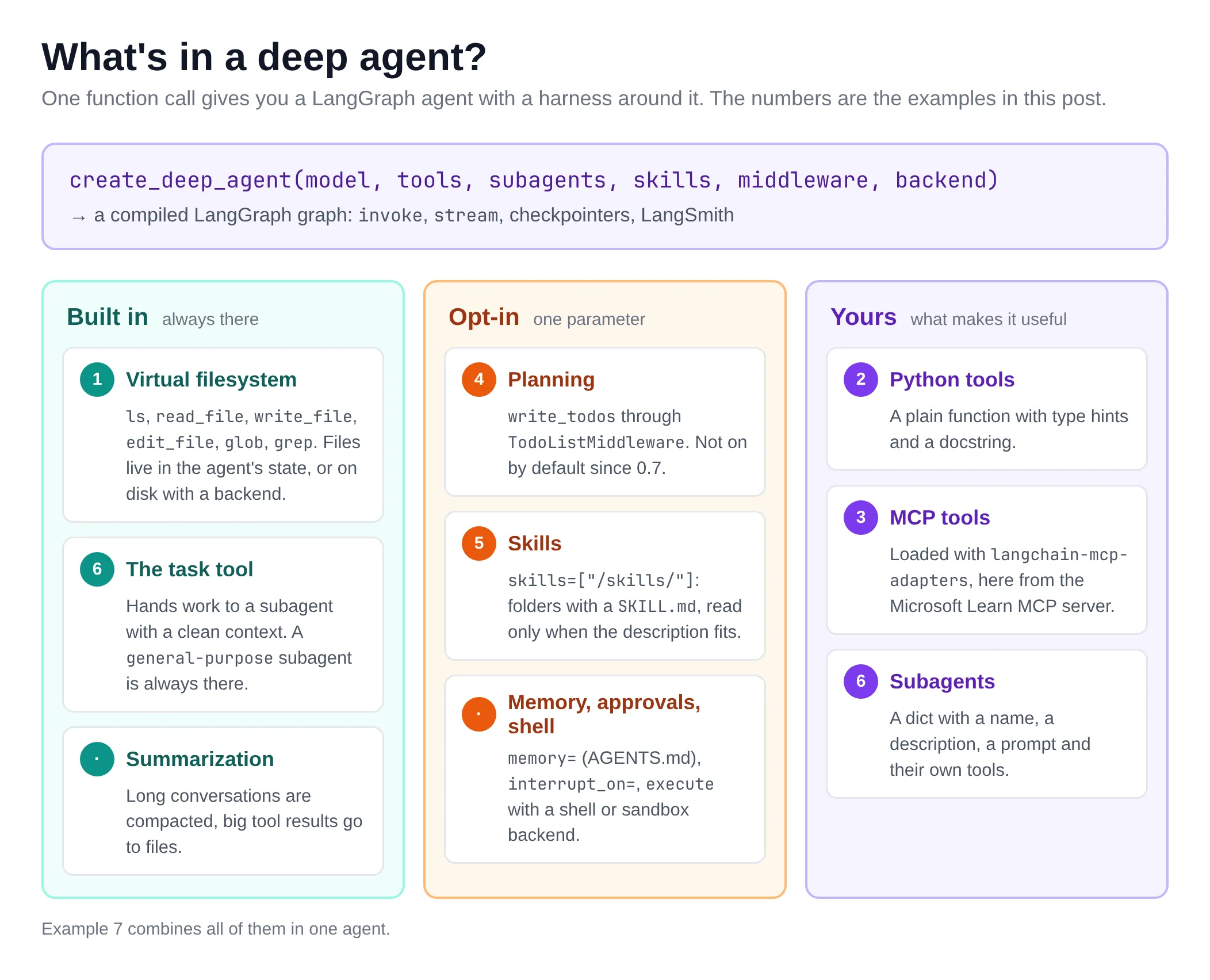
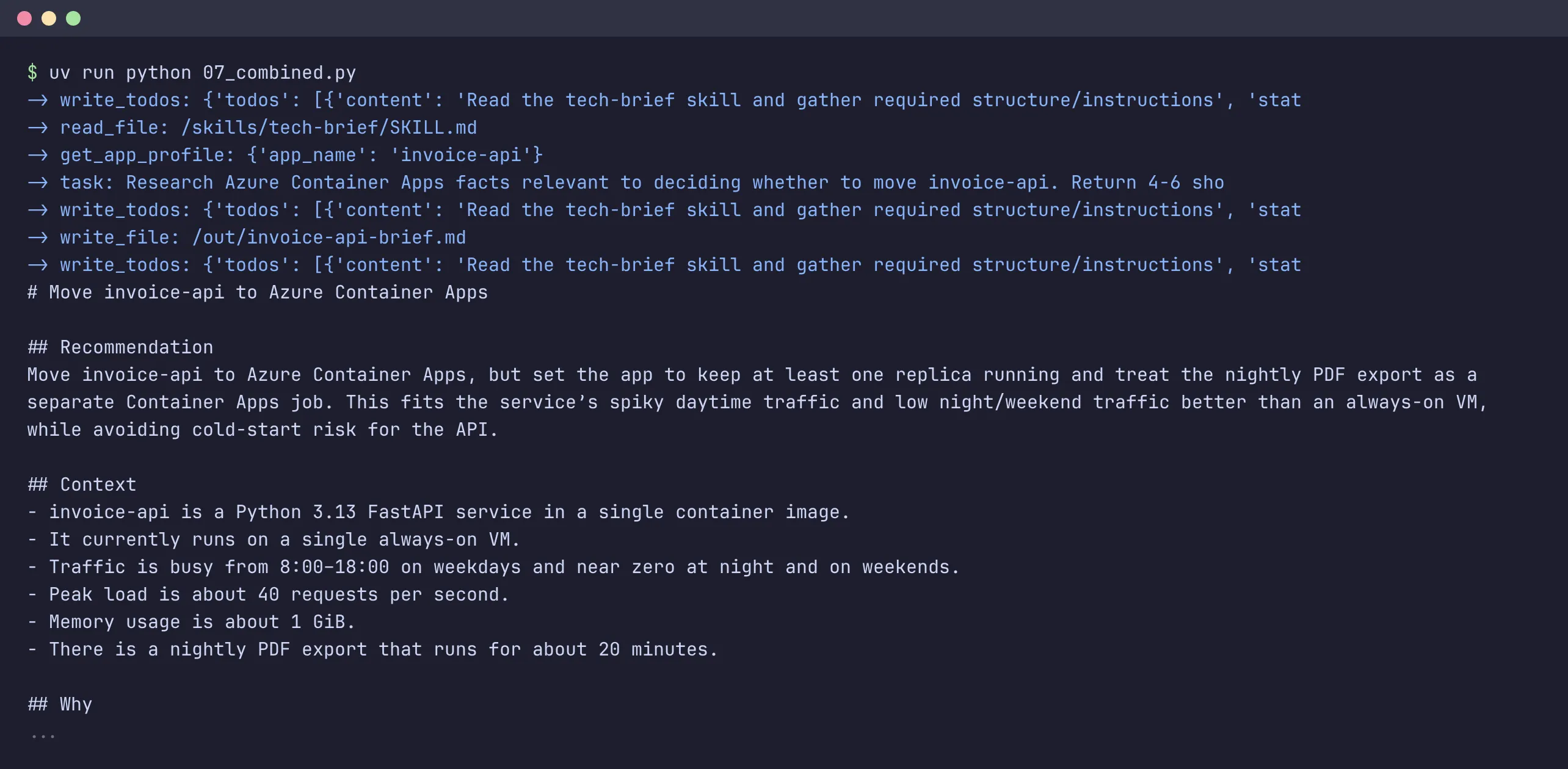
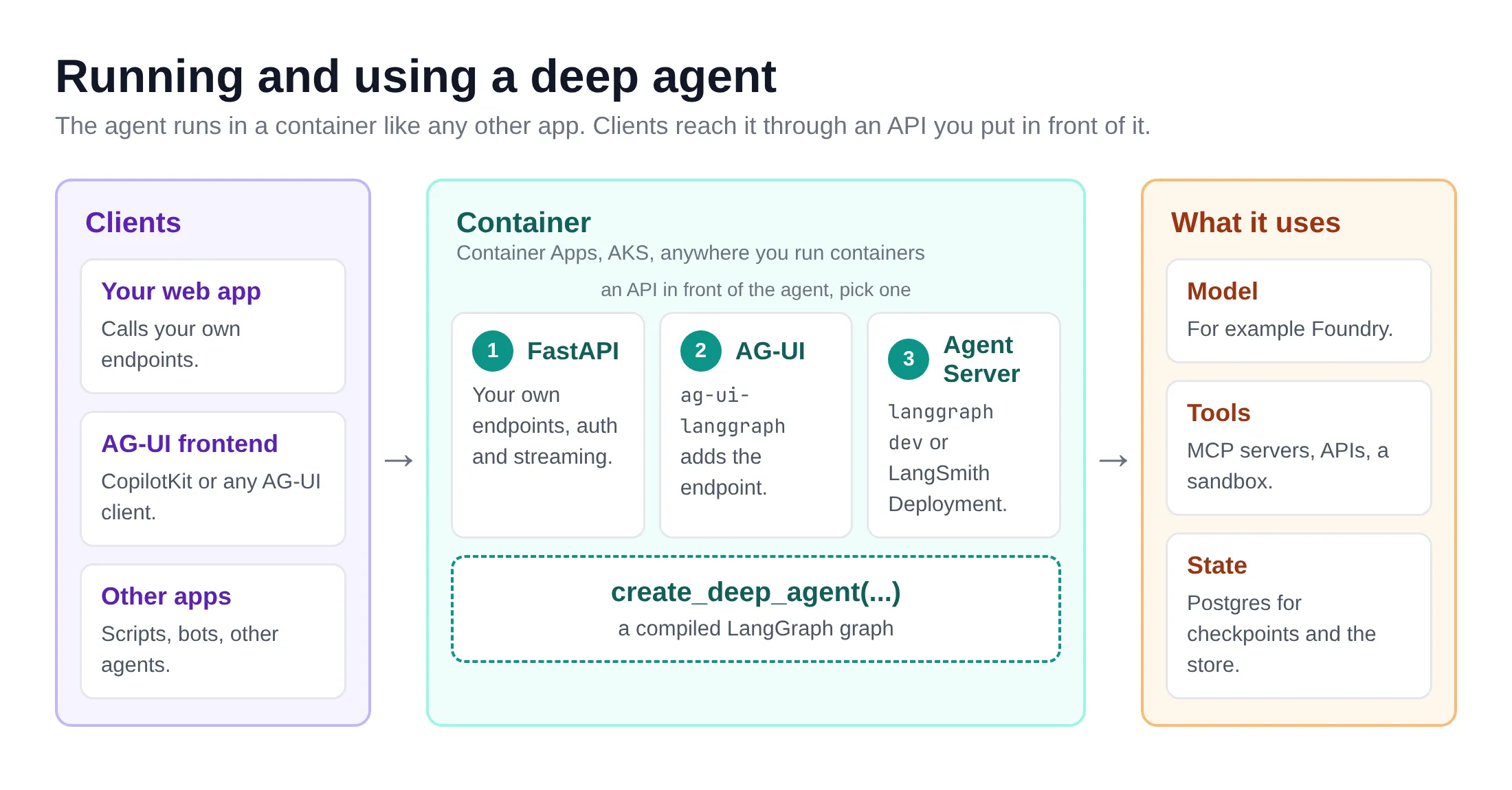
Deep Agents from zero: seven small examples A basic agent is a model calling tools in a loop. That’s enough for simple tool calls, but it falls apart on longer work: the agent loses track of what it was doing, its context fills up with tool output, and it has nowhere to put intermediate results. 🤷 LangChain’s Deep Agents library adds the harness that tools like Claude Code have around that loop: a filesystem, subagents, skills, planning and context management. I build most of my agents with Deep Agents these days, and a few people asked how to get started with it. So this post is the introduction I would have liked: seven small examples that build on each other, each one small enough to read in one go. The diagram shows what we’ll cover. The numbers are the examples below. What are Deep Agents? deepagents is a Python library (there’s a TypeScript version too) with one main function: create_deep_agent. It builds a LangChain agent with a set of middleware already wired in, and returns a compiled LangGraph graph. So everything you know from LangGraph still works: invoke, stream, checkpointers, LangSmith tracing. What you get out of the box: A virtual filesystem: ls, read_file, write_file, edit_file, glob and grep. Virtual is the important word: by default the files live in the agent’s state, not on your disk. When the agent writes a file, nothing shows up in your folder. To get real files on disk, you configure the agent with a different backend, such as FilesystemBackend(root_dir=...). We’ll do that in example 5. More in the Backends docs. The task tool: the agent can hand work to a subagent that starts with a clean context, and only gets the result back. See Subagents. Context management: long conversations get summarized, and large tool results are moved to files instead of filling the context window. See Context engineering. Other features are off until you ask for them. Each one is a single argument to create_deep_agent: Planning: middleware=[TodoListMiddleware()] adds the write_todos tool, so the agent writes a plan and ticks items off as it works. We do that in example 4. Skills: skills=["/skills/"] points the agent to folders with a SKILL.md. It only sees each skill’s name and description, and reads the full instructions when it needs them. That’s example 5. See Skills. Memory: memory=["/AGENTS.md"] loads AGENTS.md files into the system prompt at the start of every run. The agent can update them with edit_file when it learns something, and with a backend that persists files, it remembers that in the next conversation. See Memory. Human approval: interrupt_on={"write_file": True} pauses the agent before that tool runs, so you can approve, edit or reject the call. It needs a checkpointer, more on that near the end. See Human-in-the-loop. A shell: pass a backend that can run commands as backend=, such as LocalShellBackend (your own machine) or a sandbox, and the agent gets an execute tool. See Sandboxes. ⚠️ Important: Deep Agents moves fast. Everything below was tested with deepagents 0.7.32, langchain 1.4.7, langchain-openai 1.7.3, langchain-mcp-adapters 0.3.2, langchain-azure-ai 1.2.12 and langgraph-checkpoint-postgres 3.2.0 (October 2026). Since 0.7, the planning tool is no longer included by default. Older blog posts and tutorials assume it is. Setup You need Python 3.11 or later, uv and a model. Let’s create a project: uv init deepagents-intro && cd deepagents-intro uv add deepagents langchain-openai langchain-mcp-adapters The examples use model="openai:gpt-5.4-mini". That string goes to LangChain’s init_chat_model, so any provider works: anthropic:claude-sonnet-4-6, google_genai:..., ollama:.... Install the matching langchain- package and set its key. Pass a model explicitly: relying on the default model is deprecated. I ran everything against a gpt-5.4-mini deployment in Azure AI Foundry. Its OpenAI v1 endpoint works with the plain OpenAI client, so two environment variables are enough: export OPENAI_BASE_URL=https://.openai.azure.com/openai/v1/ export OPENAI_API_KEY= # no keys? an Entra token works too (it expires after about an hour) export OPENAI_API_KEY=$(az account get-access-token --resource https://cognitiveservices.azure.com --query accessToken -o tsv) The deployment name is the model name, so with a deployment called gpt-5.4-mini the model string stays the same. With plain OpenAI, set only OPENAI_API_KEY. ⚠️ For openai: models, Deep Agents uses the Responses API by default. The Foundry v1 endpoint supports it. If your gateway only does chat completions, pass init_chat_model("openai:...", use_responses_api=False) as the model instead of the string. There’s also a class made for Foundry: AzureAIOpenAIApiChatModel in the langchain-azure-ai package. It takes your Foundry project endpoint and an Azure credential, so there’s no key or expiring token to put in an environment variable. Install it with uv add langchain-azure-ai azure-identity and pass the model object instead of the string: from azure.identity import DefaultAzureCredential from langchain_azure_ai.chat_models import AzureAIOpenAIApiChatModel # reads AZURE_AI_PROJECT_ENDPOINT=https://.services.ai.azure.com/api/projects/ model = AzureAIOpenAIApiChatModel(model="gpt-5.4-mini", credential=DefaultAzureCredential()) agent = create_deep_agent(model=model, system_prompt="...") I kept the openai: string in the examples so they work with any OpenAI-compatible endpoint, but if you build on Foundry, this is the cleaner option. See Microsoft Foundry in the LangChain docs. Tip: set LANGSMITH_TRACING=true and LANGSMITH_API_KEY to see every model call and tool call in LangSmith. It’s optional, but it makes the examples a lot easier to follow. 😊 1. A minimal deep agent Let’s start with the smallest possible agent: a model and a system prompt, no tools of our own. from deepagents import create_deep_agent agent = create_deep_agent( model="openai:gpt-5.4-mini", system_prompt="You are a concise assistant. Save anything longer than a few lines to a file.", ) result = agent.invoke( {"messages": [{"role": "user", "content": "Write three tips for naming Azure resources to /tips.md, then summarize them in one line."}]} ) print(result["messages"][-1].text) print("\nFiles in the agent's state:", list(result["files"])) print(result["files"]["/tips.md"]["content"]) Save it as 01_minimal.py in the project and run it with uv run python 01_minimal.py: Saved to `/tips.md`. Summary: Use a consistent, concise Azure naming convention that encodes type/environment/workload, avoids special characters, and standardizes casing/separators. Files in the agent's state: ['/tips.md'] 1. Use a consistent naming convention that includes the resource type, environment, and workload. 2. Keep names short but descriptive, and avoid spaces or special characters. ... What happened here: We gave the agent no tools, yet it wrote a file. That’s the built-in write_file tool. The file is not on your disk. The default backend (StateBackend) keeps files in the graph state, so result["files"] holds them. Add a checkpointer and they survive between turns of the same thread. result["messages"] is the full conversation, including the tool calls. The last message is the answer. 2. A custom Python tool A tool is a plain Python function. The type hints become the schema and the docstring becomes the description, so write the docstring for the model. This one calls the free Frankfurter API for exchange rates (no key needed): import httpx from deepagents import create_deep_agent def get_exchange_rate(base: str, target: str) -> str: """Get today's exchange rate between two currencies, using ISO codes like EUR or USD.""" r = httpx.get("https://api.frankfurter.dev/v1/latest", params={"base": base, "symbols": target}, timeout=10) r.raise_for_status() data = r.json() return f"1 {base} = {data['rates'][target]} {target} (ECB rate of {data['date']})" agent = create_deep_agent( model="openai:gpt-5.4-mini", tools=[get_exchange_rate], system_prompt="You help with travel budgets. Always use get_exchange_rate for rates, never guess.", ) result = agent.invoke( {"messages": [{"role": "user", "content": "I have 1200 EUR for a week in Tokyo. What is that in yen, and per day?"}]} ) for message in result["messages"]: for call in getattr(message, "tool_calls", []): print(f"-> {call['name']}({call['args']})") print(result["messages"][-1].text) The loop at the end prints every tool call, so we can see what the agent did: -> get_exchange_rate({'base': 'EUR', 'target': 'JPY'}) Using today's rate: - 1 EUR = 175.92 JPY - 1200 EUR = 211,104 JPY ... So your budget is about ¥211,104 total, or ¥30,159 per day. tools= is additive: your tools are added to the built-in ones, never replace them. httpx comes with the OpenAI client, so there’s nothing extra to install. 3. Tools from an MCP server Most tools I use these days come from MCP servers. langchain-mcp-adapters turns them into LangChain tools, and those go into tools= like any other. Let’s use the Microsoft Learn MCP server, which is public and needs no sign-in: import asyncio from deepagents import create_deep_agent from langchain_mcp_adapters.client import MultiServerMCPClient async def main(): client = MultiServerMCPClient( { "learn": { "transport": "streamable_http", "url": "https://learn.microsoft.com/api/mcp", } } ) tools = await client.get_tools() print("MCP tools:", [t.name for t in tools]) agent = create_deep_agent( model="openai:gpt-5.4-mini", tools=tools, system_prompt="Answer Azure questions from Microsoft Learn only. Cite the URLs you used.", ) result = await agent.ainvoke( {"messages": [{"role": "user", "content": "What is the maximum number of replicas for an Azure Container App?"}]} ) # ... print the tool calls and the answer, as in example 2 ... asyncio.run(main()) The output: MCP tools: ['microsoft_docs_search', 'microsoft_code_sample_search', 'microsoft_docs_fetch'] -> microsoft_docs_search({'query': 'Azure Container Apps maximum number of replicas'}) -> microsoft_docs_search({'query': 'Azure Container Apps scaling replicas maximum Microsoft Learn'}) The maximum configurable number of replicas for an Azure Container App is **1,000**. ... Sources: - https://learn.microsoft.com/azure/container-apps/scale-app#scale-definition A few things to know: MCP tools are async, so we use ainvoke (or astream) instead of invoke. MultiServerMCPClient takes several servers at once. Use "transport": "stdio" with a command and args for local servers. get_tools() opens a new MCP session for every tool call. That’s fine here. For servers with state, open one session with client.session("learn") and load the tools from it. ⚠️ On Foundry? A Foundry toolbox bundles the tools you configure in your project (MCP servers among them) behind one MCP endpoint. langchain-azure-ai can load it: AzureAIProjectToolbox(toolbox_name="my-toolbox") from langchain_azure_ai.tools returns the toolbox tools as LangChain tools that you pass to tools=, with Entra ID authentication handled for you. Its get_skills() even loads the toolbox skills as files for create_deep_agent. It’s in preview, so expect changes. See Use Foundry Toolbox with LangChain. 4. Planning with write_todos For longer tasks it helps when the agent writes a plan first and ticks items off as it goes. In Deep Agents that’s the write_todos tool, from LangChain’s TodoListMiddleware. Since 0.7 you add it yourself: from deepagents import create_deep_agent from langchain.agents.middleware import TodoListMiddleware agent = create_deep_agent( model="openai:gpt-5.4-mini", middleware=[TodoListMiddleware()], # adds the write_todos tool (opt-in since deepagents 0.7) system_prompt="You are a technical writer. Plan with write_todos first, one item per section, and keep the list up to date.", ) task = ( "Write a short checklist for moving a Flask app to Azure Container Apps to /checklist.md. " "Cover the container image, secrets, scaling and monitoring, one section each." ) todos = [] for state in agent.stream({"messages": [{"role": "user", "content": task}]}, stream_mode="values"): if state.get("todos", []) != todos: todos = state["todos"] print("\n".join(f" [{t['status']:>11}] {t['content']}" for t in todos), end="\n\n") print(state["files"]["/checklist.md"]["content"]) This time we stream with stream_mode="values", which gives us the full state after every step. The todo list lives in the state under todos, so we print it whenever it changes: [in_progress] Draft checklist sections for container image, secrets, scaling, and monitoring [ pending] Write the checklist to /checklist.md [ pending] Verify the file content is correct [ completed] Draft checklist sections for container image, secrets, scaling, and monitoring [ completed] Write the checklist to /checklist.md [in_progress] Verify the file content is correct ... The tool itself does nothing clever: it stores a list of items with a status (pending, in_progress, completed). The value is mostly that your UI can show progress. Note that the model didn’t follow “one item per section”. It’s a hint, not a contract. 😊 ⚠️ Why is it opt-in now? LangChain benchmarked the todo list on their Deep Agents evals with GPT-5.6 Terra, Claude Opus 4.8 and GLM 5.2. It gave no significant accuracy gain on any of them, and it cost more tokens on two of the three (GPT-5.6 Terra even scored a bit better without it). Turn it on when you want to show progress in a UI, or when your own evals say it helps. 5. Skills with SKILL.md A skill is a folder with a SKILL.md file: YAML frontmatter with a name and a description, then instructions in Markdown. Deep Agents puts only the names and descriptions in the system prompt. The agent reads the full file when a task fits the description. That’s called progressive disclosure, and it means you can give an agent dozens of skills without a giant prompt. Here’s skills/release-notes/SKILL.md: --- name: release-notes description: Turn a list of commits or changes into release notes for end users. Use when asked for release notes, a changelog or a "what's new" summary. --- # Release notes 1. Group the changes under these headings, in this order, and leave out empty ones: `### ✨ New`, `### 🛠 Improved`, `### 🐛 Fixed`. 2. Write one bullet per change, in plain language for users, not developers. No commit hashes, no file names. 3. Merge changes that are really one feature into one bullet. # ... The name must match the folder name. Skills are read through the agent’s backend, so to load them from disk we switch to a FilesystemBackend: from pathlib import Path from deepagents import create_deep_agent from deepagents.backends import FilesystemBackend here = Path(__file__).parent agent = create_deep_agent( model="openai:gpt-5.4-mini", backend=FilesystemBackend(root_dir=here, virtual_mode=True), # the agent sees this folder as / skills=["/skills/"], system_prompt="You are a helpful assistant for a small product team.", ) commits = """ a1f3c2e feat: export reports to PDF 9b8d7e1 fix: dark mode toggle not saved after restart 4c2a9f0 chore: bump fastapi to 0.142 e7d1b33 feat: PDF export now includes charts 1f0e8a2 perf: dashboard loads 2x faster """ result = agent.invoke( {"messages": [{"role": "user", "content": f"Release notes for version 2.3, please:\n{commits}"}]} ) # ... print the tool calls and the answer ... The prompt doesn’t mention the skill, yet the first thing the agent does is read it: -> read_file({'file_path': '/skills/release-notes/SKILL.md', 'offset': 0, 'limit': 1000}) Version 2.3 brings faster dashboards, improved PDF exports, and a fix for dark mode settings. ### ✨ New - Export reports to PDF, including charts. ### 🛠 Improved - Dashboard pages now load much faster. ### 🐛 Fixed - Dark mode preferences are now saved correctly after restart. The two PDF commits became one bullet and the dependency bump is gone, just like the skill says. ⚠️ With a FilesystemBackend, write_file and edit_file change real files in root_dir. virtual_mode=True (the default) keeps the agent inside that folder. Don’t point it at your home directory. Without the backend, skill files have to be passed in the state with invoke(files={...}). Skills don’t have to live on disk. A StoreBackend keeps files in a LangGraph store, and with PostgresStore (from https://baeke.info/2026/10/30/deep-agents-from-zero-seven-small-examples/ #deepagents #sevensmall #smallexamples #context #see #skills #claudecode #memory #planning #important #rss #feeds #linksharing #qwibbit