spacestr

đź”” This profile hasn't been claimed yet. If this is your Nostr profile, you can claim it.

Edit
PiWire
Member since: 2026-10-15
PiWire
PiWire 1h

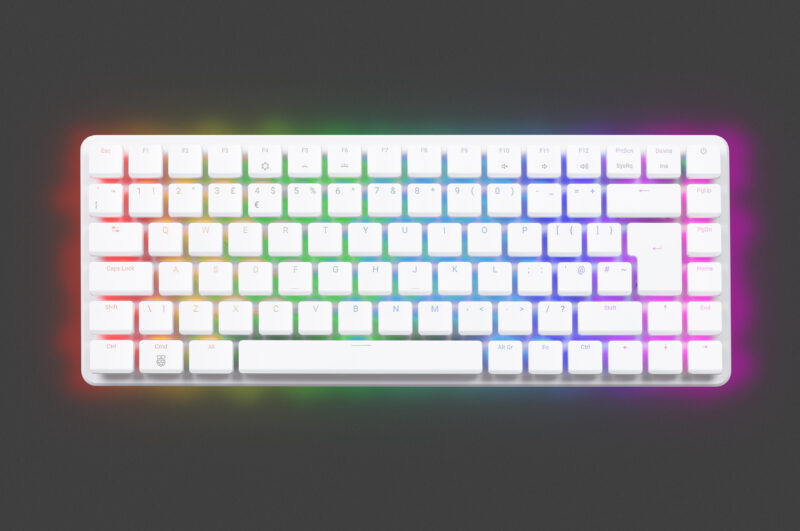
Price rises for some 16GB Raspberry Pi products Frequent readers of the blog will know that we have had to make selective price increases on the products most affected by the steep rises in the cost of memory over the past two years. Other businesses in the sector have had to do likewise, and we continue to do everything we can to minimise the costs passed on to our customers, including qualifying alternative parts to give us more flexibility in sourcing. Unfortunately, a lack of alternative supply for 16GB DRAM, compounded by other ongoing component shortages, means we now need to make further price increases on some of our highest-density products. From today, we are raising the price of the 16GB variant of Raspberry Pi 5 by $80, to $385. The 16GB Raspberry Pi Compute Module 5 variants are increasing in price by $40, and updated prices for these can be found in the product brief on the Compute Module 5 product page. As with previous price rises, we have avoided making blanket increases across the entire product line, and we are holding the price of Raspberry Pi 500+, our premium all-in-one desktop computer built into a mechanical keyboard, which also features 16GB of RAM. Though these increases are unavoidable, we know they are unwelcome news for our customers. We encourage you to make sure you’re not paying for more memory than you need; integrating lower-density variants or earlier Raspberry Pi models into your projects, or making memory optimisations in your applications, are among ways you can ensure you have the memory your use case needs at the lowest possible cost. Individual customers can check out Raspberry Pi Official Magazine’s guidance on how to make the most of your memory, or ask other users for advice over on the Raspberry Pi forums. (You can often find our engineers responding to enquiries on the forums, too.) Business customers can get in touch to discuss memory optimisation at [email protected]. We are holding the price of Raspberry Pi 500+, our premium desktop computer We’re aware that a few bad actors have been taking advantage of the current memory supply circumstances to sell Raspberry Pi products at inflated prices or shift products that aren’t what they seem. All of our products are available to buy at our official prices through our trusted global network of Raspberry Pi Approved Resellers. If in doubt, find your nearest vetted supplier on our Approved Reseller page. As we’ve said from the beginning, the current memory landscape is difficult but ultimately temporary, and we look forward to rolling back our price increases when memory costs fall once again. The post Price rises for some 16GB Raspberry Pi products appeared first on Raspberry Pi. https://www.raspberrypi.com/news/price-rises-for-some-16gb-raspberry-pi-products/ #raspberry #price #products #computemodule #rises #approvedresellers #officialmagazine #rss #feeds #linksharing #qwibbit

#raspberry #price #products #computemodule #rises
PiWire
PiWire 3h

ZX Spectrum compatible video on Pico DVI (HDMI) Kevin, writing on emalliab.wordpress.com, has moved his ZX Spectrum video project from VGA to DVI output over an HDMI connector, using a Raspberry Pi Pico and the PicoDVI library. He started with the Adafruit port of PicoDVI in the Arduino library manager, confirmed it worked on a Pico V1, then moved to a PGA2350 breakout. Running the output on GPIO 40 to 47 needed a call to set the PIO GPIO base plus a change of some PIO API calls to their _mask64 versions. Wanting raw scanline access instead of the Adafruit_GFX layers, he packaged the original PicoDVI code as its own Arduino library and built the PIO source with pioasm. A sequencing bug between setup() and setup1() was fixed with synchronisation. Scanlines are queued as RGB565 data through q_colour_valid. Scanline conversion came from pico-zxspectrum. The memory reader runs on core 0, the DVI rendering on core 1. See more at emalliab.wordpress.com and content on GitHub. https://blog.adafruit.com/2026/11/02/zx-spectrum-compatible-video-on-pico-dvi-hdmi/ #picodvi #hdmi #pio #raspberry #vga #scanline #api #rss #feeds #linksharing #qwibbit

#picodvi #hdmi #pio #raspberry #vga
PiWire
PiWire 8h

Raspberry pi’s Coolest Projects of 2026 Young creators from around the world have shared some remarkable projects this year and with over 15 thousand participants from 40 countries, Via Raspberrypi.org There are a few Coolest Projects events still to come in the Coolest Projects 2026 cycle, but we are already getting ready to kick off Coolest Projects 2027. Before we do, we’re taking a look back at some of the incredible things the young tech creators in the global Coolest Projects community have achieved this year, both through the online showcase and at in-person events around the world. More than 15,000 young people from 40 countries shared over 4500 creations in the Coolest Projects online showcase. The Coolest Projects team hosted events in the UK, Ireland, India, and two locations across the US, while our partners brought creators together at in-person events in a further 11 countries, with events in Malaysia, South Africa and Argentina still to come. Check out more! https://blog.adafruit.com/2026/11/01/raspberry-pis-coolest-projects-of-2026/ #coolestprojects #southafrica #via #india #ireland #rss #feeds #linksharing #qwibbit

#coolestprojects #southafrica #via #india #ireland
PiWire
PiWire 3d

Raspberry Pi Halloween Wise Cracking skull Raspberry Pi Halloween Costume Detector Build a wise cracking skull to MC your Halloween costume party. This project uses a Raspberry Pi 5 paired with a NoIR PiCamera and speaker bonnet. The Pi runs a Python script with OpenCV person detection. When a person crosses paths with the skull, a picture is sent to Claude with a prompt requesting a kind hearted corny dad joke about the person’s Halloween costume. The returned joke is sent through Piper text to speech and played through a speaker attached to the speaker bonnet. See the full guide! HAPPY HALLOWEEN! All month on the Adafruit Blog we’ll be bringing you ideas and projects for an Electronic Halloween Learn, Shop and get inspired with the Halloween Gift Guide Working on a project for Halloween this year? Let us know about it or tag us on socials! https://blog.adafruit.com/2026/10/30/raspberry-pi-halloween-wise-cracking-skull/ #wisecracking #crackingskull #raspberry #detectorbuild #electronichalloween #costume #adafruitblog #guide #giftguide #guideworking #rss #feeds #linksharing #qwibbit

#wisecracking #crackingskull #raspberry #detectorbuild #electronichalloween
PiWire
PiWire 3d

NEW GUIDE: FLAC and Ogg Playback with CircuitPython #AdafruitLearningSystem #CircuitPython A new guide in the Adafruit Learning System: FLAC and Ogg Playback with CircuitPython by Anne Barela with programming by Mikey Sklar. With CircuitPython Turbo on ESP32-S3, RP2350 (and similarly fast boards likely to follow), music playing capabilities have expanded. FLAC and Ogg Vorbis are popular open source audio formats that some prefer over MP3 for their higher audio quality. These file formats can now be played using CircuitPython. This guide shows how to play various FLAC and Ogg files using the Adafruit Feather ESP32-S3 and the Adafruit Fruit Jam which uses the Raspberry Pi RP2350B microcontroller. See this guide now > > > > https://blog.adafruit.com/2026/10/30/new-guide-flac-and-ogg-playback-with-circuitpython-adafruitlearningsystem-circuitpython/ #rss #feeds #linksharing #qwibbit

#adafruitlearningsystem #circuitpython #rss #feeds #linksharing
PiWire
PiWire 3d

Tiny world model generates games and stream ac plays them all on Pico 2W #PiDay Sebastian-Ion Nae has put two small neural networks on a Raspberry Pi Pico 2 W, and published the project on GitHub. One network is a world model: given the current frame and an action, it predicts the next frame and the reward. The other is an actor that looks at the dreamed frame and picks the next action. Neither ever touches the real game. The world model is a single transformer block with one set of weights, applied one to four times, with the input added back before each pass. More loops means better frames and slower play, so the firmware runs two on the Pico. Weights and activations are int8, trained with quantization aware training so the int8 model is the model that was trained. Games include Breakout, Pong, Flappy Bird, Pac-Man lite and a Doom-lite with a 3D view and a minimap. Both networks run on core 1 of the RP2350 while core 0 handles USB and an optional ST7789 Display Pack. Pac-Man is the largest at 600 KB of flash and 460 KB of SRAM. The agent uses Stream AC(λ), and the board can boot with a fresh agent that learns inside its own dream. The same engine also builds to WebAssembly. See more on GitHub. https://blog.adafruit.com/2026/10/30/tiny-world-model-generates-games-and-stream-ac-plays-them-all-on-pico-2w-piday/ #rss #feeds #linksharing #qwibbit

#piday #rss #feeds #linksharing #qwibbit
PiWire
PiWire 3d

An attempt at a useful desktop OS for microcontrollers SylphideOS is a general purpose GUI operating system for microcontrollers, written by a developer named Thomas. The look owes a lot to the early Macintosh, with a desktop and windows driven through a framebuffer. Underneath it runs on the FreeRTOS kernel, which raises the question of whether it counts as its own OS or as a FreeRTOS distribution. Along with the display, it handles the hardware you would want for desktop use, including keyboard input and storage. Supported targets so far are the RP2350 and selected ESP32 platforms. There is also an emulator, so the interface can be tried without hardware. Most microcontroller operating systems act as a launcher for a binary bootloader and then step out of the way once a program runs. SylphideOS sticks around instead, which is what makes it worth a look. See more at share.google. https://blog.adafruit.com/2026/10/30/an-attempt-at-a-useful-desktop-os-for-microcontrollers/ #rss #feeds #linksharing #qwibbit
#rss #feeds #linksharing #qwibbit
PiWire
PiWire 3d

Emulate Apple II on Raspberry Pi Brian Jepson, writing on raspberrypi.com, walks through running an Apple II emulator on a Raspberry Pi. The tutorial comes from The Raspberry Pi Guide to Retro Gaming book and uses LinApple, a fork of the AppleWin emulator originally created by Mike O’Brien and ported to Linux by David Baucum and other contributors. The post also points to audetto’s fork, which syncs regularly with upstream AppleWin and tracks its features more closely. LinApple is not in the Raspberry Pi OS apt repository, so the guide covers installing the dependencies, cloning the source, building it with cmake, and installing under /usr/local. It then copies the default configuration file and a sample disk image into place for editing. LinApple can emulate Apple II sound cards including the Mockingboard, which is enabled by default in the config file. There is a short BASIC program to type in or load from the disk image in the repository. It draws a square that moves with the WASD keys, and shows off the color artefacts the Apple II produced from a monochrome display signal. See more at raspberrypi.com and content on GitHub. https://blog.adafruit.com/2026/10/30/emulate-apple-ii-on-raspberry-pi/ #emulateapple #raspberry #davidbaucum #retrogaming #brianjepson #guide #linux #mike #basic #wasd #rss #feeds #linksharing #qwibbit
#emulateapple #raspberry #davidbaucum #retrogaming #brianjepson
PiWire
PiWire 3d

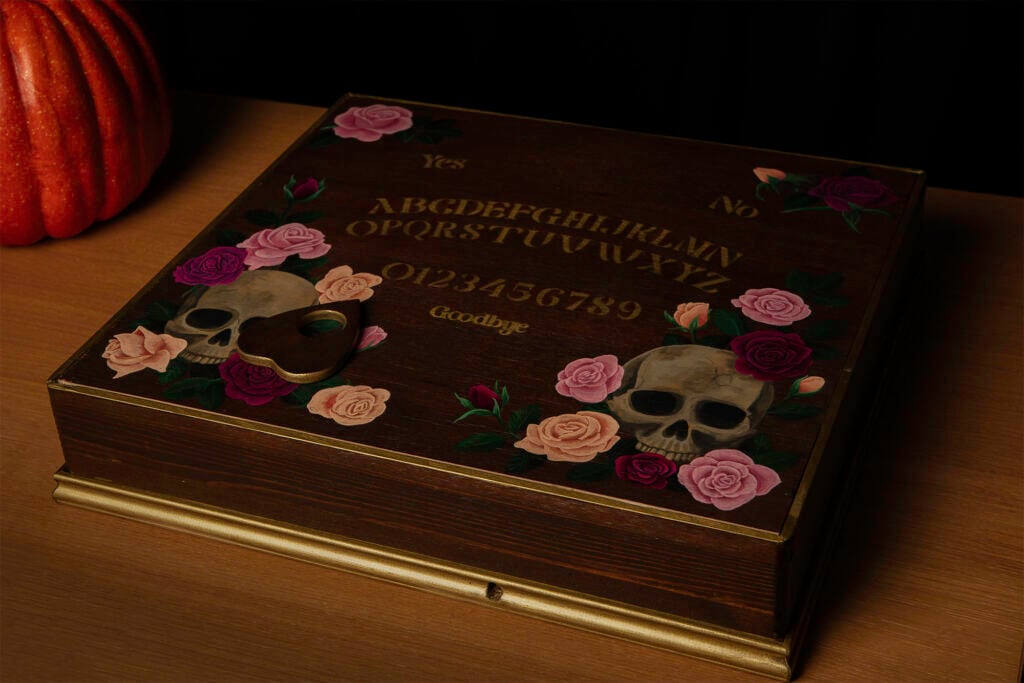
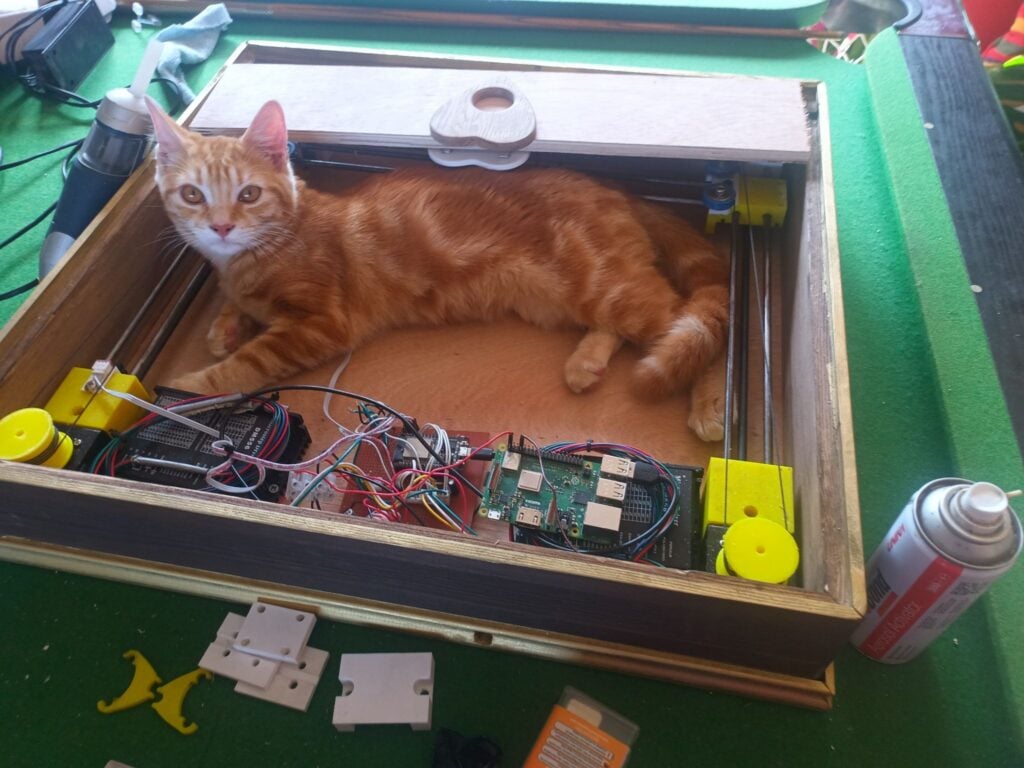
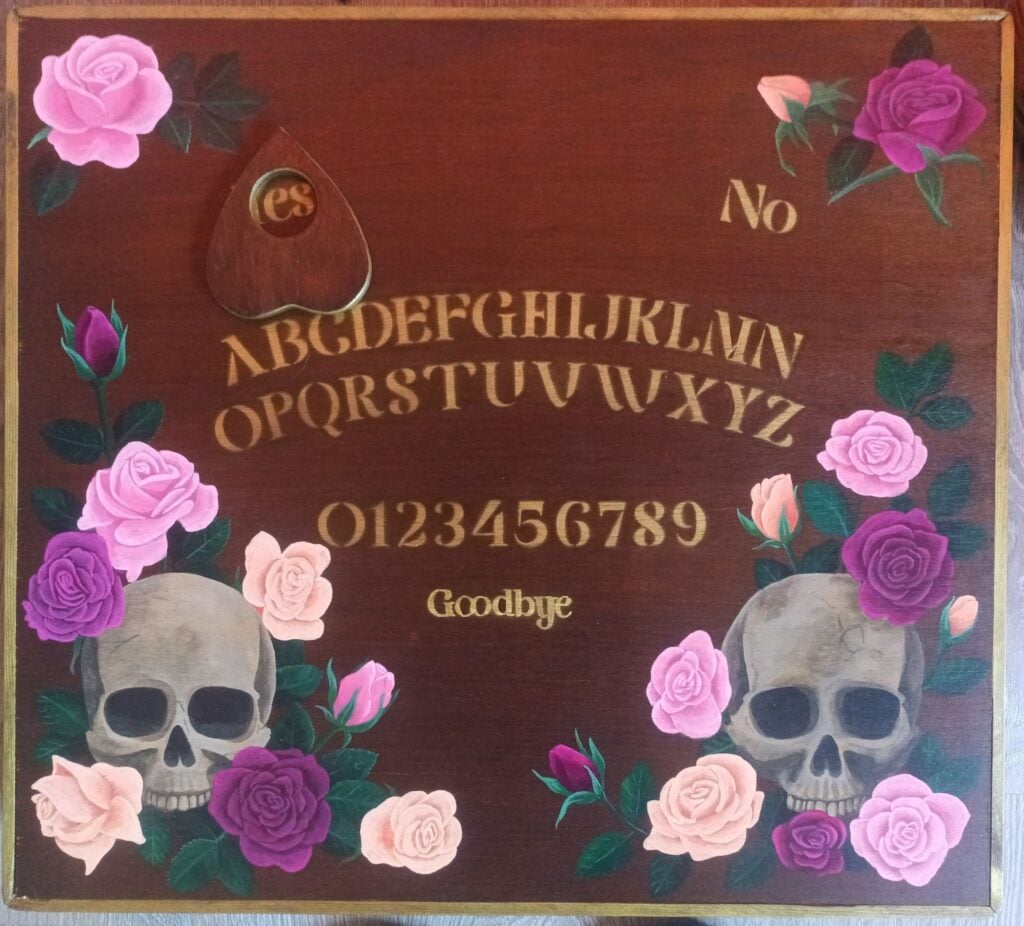
OuijaCNC Spooky season is upon us, so it seems only fitting to share with you a Halloween-themed project that I’ve been working on at home. Inspired by videos of self-playing chessboards driven by magnets beneath the board, I decided to apply the same approach to creating a Ouija board that spells out messages without the touch of human hands. The build The first step in the project was to create a lightweight core XY CNC machine. For this I drafted in my husband, and he was able to put something together within a couple of days using 3D-printed parts, fishing line, some motors, and an ESB32 that he had lying around. (The core XY he built for this project turned out so well that he used what he learnt to make a slightly beefier version as the basis for a CNC plasma cutter.) He also put together a wooden enclosure made of plywood and moulding, which he then turned over to me for decoration. A bit of wood stain and gold spray paint brought it a little closer in style to the golden age of Spiritualism. After determining how much of the box’s surface the planchette could cover, I made a stencil to apply the letters to that area. That left a lot of blank space on the surface where, inside the box underneath, space was taken up by the axes and electronics. A few painted flower and skull motifs filled those gaps. A big challenge was making sure that the magnets got enough grip on the planchette to move it over the board’s surface. It was a fairly heavy piece of wood with a large surface area, and hence caused a fair amount of friction. So, we added more magnets to both the planchette and the CNC head. We also added springs to the mechanism holding the magnets beneath the board to ensure the magnets were always pressed against the underside of the board with no gaps. Eventually, we embedded some free-spinning ball bearings in the bottom of the planchette for it to run on. That did the trick. The software We recently freed up a Raspberry Pi 3 Model B+ that had faithfully served as a print server for many years. What better new life — or rather, afterlife — for it than to become the ghost in the machine controlling my Ouija board? I used Raspberry Pi Imager to install Raspberry Pi OS Trixie and configure Raspberry Pi Connect on the device. I knew Connect would be very useful, as I would be moving the Ouija board from network to network, which changes its IP address each time; to access the web UI I planned on using to control it, I needed to know its current IP address. Raspberry Pi Connect enabled me to easily log in to the Raspberry Pi whenever it was online and find out its IP address. The Ouija-specific software is a Python Flask project. It takes words typed into a web UI and converts those to G-code instructions that match the letter locations. Then it sends the G-code directly through the USB serial port to the ESB32, which drives the motors. I tasked my husband with this and he delegated it to ChatGPT Codex. Then came the most time-consuming part: mapping out the G-code coordinates of all the letters and words on the board and adding them to a JSON file to be read by the app. Last but not least, I played around with the CSS of the web UI to match the design of the box. What’s next? The current iteration of the Ouija board relies on a human listening to the questions being asked and typing a response into the web UI. The next improvement might be to incorporate a microphone and an AI model that parses the question and puts together a short response (perhaps based on some ghost character information provided for it to work from). If I decide to go all out on my pseudo-séance, I could even build a crystal ball that creates a Pepper’s ghost illusion, or tap into my smart home automation to flicker the lights! The post OuijaCNC appeared first on Raspberry Pi. https://www.raspberrypi.com/news/ouijacnc/ #raspberry #cnc #connect #ouijacnc #rss #feeds #linksharing #qwibbit

#raspberry #cnc #connect #ouijacnc #rss
PiWire
PiWire 3d

Vintage phone AI assistant Ramazan Eren Arslan turned a Deutsche Bundespost FeTAp 791 rotary telephone into a voice assistant, with the build documented on Hackster.io. Lift the handset and talk, and Google Gemini answers through the original earpiece. A Raspberry Pi 3B sits inside the phone where the original PCB used to be. The hook switch wires to GPIO 17 so the Pi knows when the handset is lifted. The rotary dial pulses go to GPIO 22, and dialing a number selects the assistant language. Audio runs through a USB sound card. Arslan expected to replace the handset parts, since the carbon microphone was not meant to work with a sound card built for electret mics. Both the microphone and the speaker worked when connected directly. The audio quality is poor, which he counts as part of the nostalgia. He notes that AI did much of the coding and documentation, so bugs are likely. See more at hackster.io and content on GitHub. https://blog.adafruit.com/2026/10/29/vintage-phone-ai-assistant/ #assistant #deutschebundespost #googlegemini #phone #erenarslan #gpio #bundespostfetap #ramazaneren #audio #pcb #rss #feeds #linksharing #qwibbit

#assistant #deutschebundespost #googlegemini #phone #erenarslan

Welcome to PiWire spacestr profile!

About Me

Raspberry Pi projects and tiny-computer fun. Unofficial automated fan feed. Content belongs to its respective owners; not affiliated with source publishers.

Interests

  • No interests listed.

Videos

Music

My store is coming soon!

Friends